All posts by Paul Strandoo

How to choose the right ribbons for your labels

Many of our customers don’t realise the importance of getting a good match between the ribbons and labels they use. Ink ribbons are different and don’t suit all label materials.

If you don’t get it right, your labels will look faint or too black, print will rub off and you could be in line for an expensive surprise when your printhead burns out months or years before it should. If you work with chemicals, the print disappears if splashed by chemical solvents.
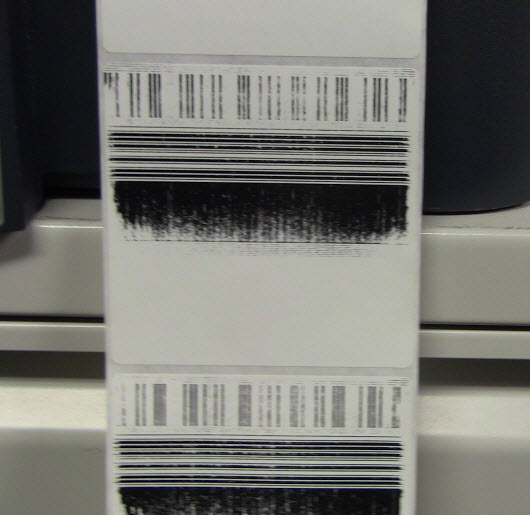
https://km.zebra.com/library/ZEBRA/V_TECHS/V_TECHS_NA/Q32013/LightPrint_Large.JPG

A quick reminder:

A thermal printer melts an ink onto the surface of your labels or tags. Ink ribbons are coated with either wax or resin or most often a mixture of the two. Wax works well on matte paper, resin works best on plastic labels. Gloss labels look best when printed with inks coated in a mixture of wax and resin.

How to match your labels to ribbons.

1. The first things to do is check dimensions. A printer ribbon needs to be at least the width of the label, the label backing and a couple of millimeters each side. If you don’t, then part of the label or it’s backing will rub against the printhead, gradually wearing a section of the printhead out. You’ll be left with a white stripe on all your labels.

2. Secondly, make sure the ribbons will fit your printer. It’s no good buying ribbons which come on rolls bigger than your printer can fit. We’ve been doing this for 20 years so we know what to check. Phone us on 01359 271 111 or email info@labelproducts.co.uk.

3. Test. Get sample ribbons (we can help you with samples) and print them through your printer. Try scratching off the print. If you’re using them with chemicals, try rubbing the text off with the chemicals. Try adjusting the printer darkness setting. Set it as low as possible to get an acceptable temperature. As a rule of thumb, wax ribbons can be printed at the lowest temperature or darkness setting, whilst a pure resin ribbon needs a high temperature or darkness setting.
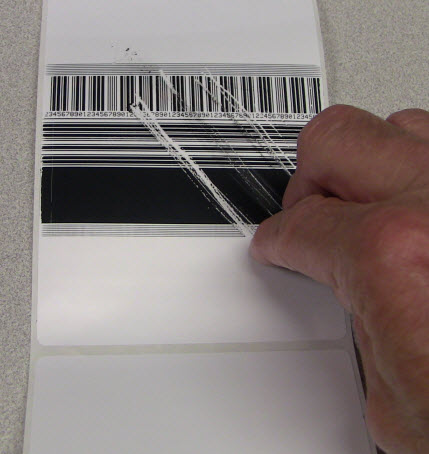
https://km.zebra.com/library/ZEBRA/V_TECHS/V_TECHS_NA/Q32013/Smear.JPG

Alternatively – send your label samples for us to test for you.

If you order labels then you need to make sure the ribbons you buy will look fantastic, not scratch or rub off and will keep your printhead cool.

Get Started with the Internet of Things for free.

k_kFqm6lwCaXTFdYpxLfdOJMPKZBAKd9jiIPYuBB

For more than two decades we, at Barcode Products, have worked (not surprisingly) with barcodes. At the simplest level, barcodes are a way of identifying objects so we can manage them. But there’s a new way of identifying and managing objects. Our largest supplier, Zebra Technologies has bet more than three billion dollars on what it thinks is next – the Internet of Things, and because of our close relationship with Zebra, we can help you experiment with this next step.

You may already know what the internet of things is, but if you don’t – here’s a summary.

The internet of things (IoT) is where billions of devices or objects are connected to the internet. Everything from heating controls in our homes, engine management systems in our cars and ‘smart labels’ on our products. Data from these connected devices is analysed using the powerful computing power we currently have at our disposal and made meaningful. The benefits are unlimited. Energy efficiency in our homes and cars and knowing what products are in what locations and what work has been done to them are just scratching the surface – the uses can’t be imagined at the moment.

So how can you use this and how can we help you?

Zebra’s IoT is called Zatar and it’s described as Facebook for things. Each object has a tag that identifies it. In the case of electronics such as TV screens, barcode printers or mobile phones, these are easily identified using existing internal electronics. In the case of less intelligent objects, these need to be identified using ‘smart tags’. Once an object is connected to the internet, it can be connected to Zatar and a profile page is created. You’re able to add whatever you think is important to the profile page – weight, location, serial number, person responsible and so on. You’re also able to add updates such as when the device was used, when it was serviced, when it was last recharged and so on.

Now you have information about your items recorded in a database you can do something with it. You can extract data about items that need servicing in the next month. You can sell items to your clients and tell them what needs servicing this month, adding an efficient and profitable new revenue stream to your business.

oeNdB4IVncaBHA2AP6qFxjvPf7FxC-KluWHeHu4p

We have access to Zebra’s Zatar system and the hardware to build a system. We can help you build a small-scale prototype to prove a positive return on investment. Call us on 01359 271 111. Britain has been described as a productivity backwater, with even the French having higher rates of productivity than the UK. Zatar and the Internet of Things are one thing that can change that – raising productivity and ultimately profitability.