All posts by Miles

QR Codes – How They Work and What You Can Do with Them.

QR codes. You’ll have seen them everywhere, on business cards, posters, shop windows, product packaging, but what are they?  How can they help us? How can we get them?
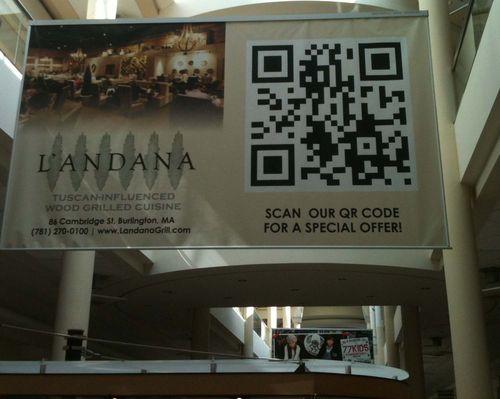
QR Codes used on a poster
QR Code for Special offer

What can QR Codes Be Used For?

Here are some ways you might use QR codes:

* Include your electronic business card (vCard)
* Have customers fill in satisfaction surveys on their phones
* Competition entries
* Automatically add your event to someone’s calendar
* Have an electronic RSVP on invitation letters or cards
* Direct smartphone users to “how to use” youtube videos – to watch on the phone
* Use a coupon to encourage visitors to visit your business
* Follow on Twitter
* Create electronic queuing tickets at your service counter.

What are QR codes?

QR codes are the pattern of dots at the top of this article.  It’s a form of 2D barcode that can store a wide range of information.  Because QR codes can contain thousands of characters of data, it’s really easy to encode a website URL and other things that you don’t have space in with a standard barcode.

QR codes have been around since 1994 when Denso in Japan developed them.  Slowly they’re appearing more and more – even our home internet router has a QR code on it (scan it and it enters the password into your phone).

To read a QR code, you need a special barcode scanner or camera.  Smartphone cameras are able to read them as standard.  There are lots of free QR readers available for iPhone or Android.

When you scan a QR code, your phone’s browser goes directly to the website (or adds a person’s contact details or starts playing an instruction video or what ever else the QR code says).

What’s exciting is that you can create your own QR codes for free and very easily.  Go on and use them to create QR codes for business cards, birthday invitations or posters.  Phone us now and have us make up QR codes labels to go on your products, taking your clients to a ‘how to use’ video on Youtube.

How do you create QR codes?

It’s easier than you might have thought.

Here’s how to include a QR code in your brochures, flyers, posters, business cards, mailings, wedding invitation, product labels (it doesn’t have to be promotional material). The code doesn’t even have to be in hard copy – it can just as easily be a digital image to display on a phone screen.

First – visit one of the many free online QR-code generators on the web that allow you to produce your own codes.

QR Code
Scan this code with your phone

Try www.qrstuff.com/ for starters.  It’s very easy to use and it’s free. From the homepage, choose what you want to encode in the code.  Choose from a straightforward web address to phone numbers or calendar entries.  I’ve used a map as an example in this QR code to the left (scan it and see).  Choose a colour and hit the download QR code button. Your QR code is available to download it as an image file for offline use or to include on an email or webpage like this one.

Download the image file you create and use it as a graphic in your work and you’re up and running in five minutes.

We’ve seen QR codes used to send customers to a special-offer page on a website, online maps directing them to a location or to encourage people to attend an in-store promotion where their code will entitle them to a discount. The possibilities are endless.

How do I scan QR Codes?

Reading a QR code is also simple, as long as you have a smartphone. You’ll need to install one of the many free QR code scanning apps that are available online. I use QR Reader (which enables you to create QR codes on your phone) but QR Code Reader is easy to use as well.  Most are free from your app store.

In addition to smart phones, we supply a range of 2D barcode readers that will scan QR codes.  Email me at info@expertlabels.co.uk if you want to know more.

Added extras

There are a few things you can do with QR codes to make them more powerful.  Including Google Analytics tracking codes will tell Google Analytics where that visitor came from – even down to an individual individual poster. You can use URL shortners such as Bit.ly to make your code shorter.  Shortners re-direct  visitors to your website but at the same time record when the QR code was scanned.  The benefit here is that you can change where the URL shortner takes you.  You can also easily track how many people are scanning your QR code.

Start using QR codes today

1.  Go to www.QRStuff.com and make a QR code that sends visitors to a contact us page on your website.

2.  Print it onto labels

3.  Stick the labels onto your business card

4.  If you want to see how many people scan the QR code, create a bit.ly account.  Create a bit.ly url that points to your contact us page and take that bit.ly url and encode it into your QR code.  Check back to your bit.ly account from time to time to see how many scans your code gets.

Try scanning the QR code above. As always, I’d love to hear your stories about your barcode experiences and if you need help with selecting QR-code scanners or label printers, please contact us. You can email info@expertlabels.co.uk or call us on 01359 271 111 for more information.

Updated 21 Jan 2022

Best Thermal label printers for under £300

With hundreds of label printers on the market – how do you know which to buy?  Expert Labels work with all the major brands and many of the specialist brands so we’re able to find the best thermal label printers to suit your needs and your budget.  Read this article where we summarise the best barcode printers for less than £300.  See our recommendations at the bottom of the page.  Updated December 2020.

A note on prices – please contact us for up to date prices as prices change weekly.  Prices have been included for comparison purposes.  Prices exclude VAT.

PrinterProsConsPrice
Zebra ZD220
Zebra ZD220
* Made by Zebra - the world leading thermal printer brand.
* Amazingly low price - unbeatable price for a thermal printer.
* Don't bother with the direct thermal version of the ZD220 - the Thermal Transfer version is less than £10 more.
* Easy to use, one button, simple label loading.
* Perfect for fewer than 100 labels a day.
* No LCD screen.
* 203dpi only - not higher resolution option available.
* Check your labels and tags will be compatible.
* Only takes 74m long ribbons (which is more than enough).
* Only has a USB connection.
£161.99Buy now
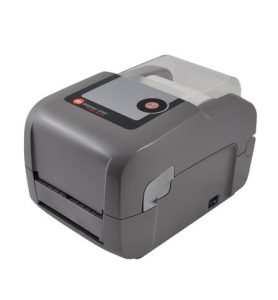
Datamax-EClassMkIIIAdvanced
Datamax-O'Neil E-Class MkIII Advanced - Also known as the Honeywell E-4205A
Datamax-O'Neil - now Honeywell - have decades of experience with Thermal printers - gaining a popular and dependable reputation.

* This printer comes with Serial/Parallel/USB and Ethernet LAN interfaces as standard.
* Comes with lots of options and accessories (at extra cost) - including a battery pack, external roll holder and a label peeler.
* Includes a 1 year warranty including printhead (unless it's printed more than 24KM of labels).
* Comes with Honeywell's own label design software (NETiraLD: Label Design Software). This is based on Seagull Scientific's BarTender - so it's well known and supported.
* Direct thermal only. Good for labels and tags that have a limited life.
* Won't print onto plastic media.
£265.25Buy now
honeywell-e-4204b basicDatamax-O’Neil E-Class Mk III Basic – Also known as the Honeywell E-4204BDatamax-O’Neil – now Honeywell – have decades of experience with Thermal printers – providing a popular and dependable reputation.
* Remarkable low cost.
* Comes with lots of options and accessories (at extra cost) – including a battery pack, external roll holder and a label peeler.
* Includes a 1 year warranty including printhead (unless it’s printed more than 24KM of labels).

Because of an extremely competitive price – this make the E-4204B one of the best thermal label printers you can buy.
Compared with the advanced model, the Basic doesn’t include Ethernet support.
* Direct thermal only. Good for labels and tags with limited life. Won’t print onto plastic media.
* Prints at 100mm per second.
£226.99Buy now
Zebra GK420dZebra GK420d* Comes with Zebra’s reputation for quality and ease of use.
* Market leading brand with widespread support and availability of printers and consumables.
* Comes with Zebra Designer label design software included for free.
* No LCD panel.
* Average print speed – 127mm per second.
* This model is Direct Thermal only - not good for long life labels
£275.89Buy now
Zebra GK420tZebra GK420t* Zebra quality and support.
* If popularity is a measure of the best thermal transfer printer – then this model is the best.
* Most widely used thermal transfer printer in the UK and Europe.
* Easy to use.
* Thermal ribbons, labels and tags widely available.
* This model is the thermal transfer model – producing long life labels and with the ability to print onto clear and waterproof labels.
* Tried and tested.
* Based on it’s popularity this is one of Zebra’s best thermal label printer.
* You pay a premium price for the Zebra range.
* The thermal ribbon length is just 74m.
* Label roll diameter is 125mm, there are printers that print longer between label and ink changes.
£305.55Buy now

Zebra ZD410
* Extremely compact in size.
* Compatible with other Zebra printer software.
* Comes with Zebra designer label design software.
* Includes Bluetooth as standard (as well as USB).
* Even prints at 6″ per second compared to 5″ for most other printers)
* Limited to labels and tags 58mm wide.
* Direct thermal print only – suitable for short life labels and tags.
£242.99Buy now
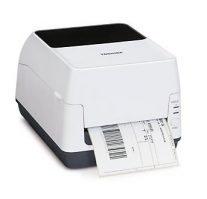
Toshiba Tec BFV4D
Toshiba TEC B-FV4D
* TEC reputation for product quality.
* Prints at up to 150mm per second.
* Comes with Serial or parallel and USB and Ethernet as standard.
* Comes with Bartender Ultralight label design software.
* Direct thermal print only – short life labels and tags.
* Not as widely available as other printer brands.
£285.10Buy now
Toshiba TEC B-EV4T* Thermal Transfer printers – for long life labels and tags.
* Uses ribbons 300m long – means fewer ribbon changes.
* Comes with Ethernet connectivity as standard – in addition to USB, and Serial or parallel.
* Not as widely available as other brands of printer.
* Ribbons aren’t as easily available as other brands.
£305.89Buy now
TSC TDP-247
TSC TDP-247
* TSC make printers for other better known brands – so you’re getting the same quality for a better price.
* The TDP-247 is fast – printing at 177mm per second.
* Emulates Zebra printers – so can be used as a direct replacement.
* Has an Ethernet and Bluetooth option (at extra cost).
* Widely available media.
* This is the Direct Thermal model – so not suited to long life labels or tags.£275.99Buy now
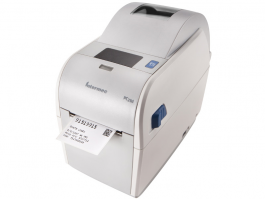
Intermec PC23d
Honeywell PC23d
* Intermec, now part of the Honeywell family, have a long reputation for quality build and design.
* The PC23d is very fast – 200mm per second.
* It’s also easy to use (you can reload labels with one hand).
* Only 2″ wide printing.
* Direct thermal only – so only good for short life labels and tags.
* Difficult to source – not as well stocked as other brands of printer.
* Only has a USB interface.
£233.99Buy now
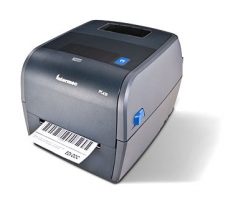
Intermec PC43t
Intermec PC43t
* Intermec, now a Honeywell company, have been building printers since the 1970s – so they know a thing or two.
* Like it’s little brother the PC43t is very fast – 200mm per second and
* Easy to use (single handed label loading).
* Takes a 300m roll of ink for longer unattended printing.
* The PC43t is difficult to source compared to other brands of printer.
* Only has a USB connection.
£299.99Buy now

Best Thermal Label Printers – Our Recommendations

For value for money and durability from a well known brand name – we’d recommend the Datamax O’Neill/Honeywell E-Class printers.  They are extremely good value for money, come in a wide range of configurations, use 300m ribbons and they’re easy to use.  Not as small as other desktop printers – so if space is an issue – look again.

No list would be complete without the market leader.  Zebra printers are widely available, well supported and cover almost every possible application.  Which model you choose depends on how many labels you print, what interfaces you need and size of printer.

We think the Zebra ZD410 is the best thermal label printer for narrow labels and tags.  It’s feature packed – it’s fast, has lots of connectivity options as standard and comes in at a competitive price.

Exploiting Barcodes to build engagement your brand

This article is for brand managers who want to build engagement with their customers to boost loyalty and sales.

Never before has a brand manager had the opportunity to connect to their customers so effectively.

Exploit QR codes, 2D codes and RFID/NFC on products using barcode printers and digital printing.  Link these ‘front end’ identifiers to back end databases and visualisation will enable brand managers to see how customers are engaging with products.

“Converters who understand how these imaging techniques slot into wider information manament systems to track customer interaction and ensure tracability through the supply chain will find a profitable niche acting as a consutland to their brand customers.”

600 correctly printed labels for Tesco – in an hour?

One of our clients, Gareth had a problem.  He had 600 packs of his premium pet food sitting in Goods In at Tesco’s Bolton distribution centre.  He had worked long and hard to win the Tesco’s account and now his credibility with this prestigious account was in jeopardy.  He was under pressure and did not want to upset this account.  He needed 600 barcode labels urgently.

Gareth’s original supplier had made a mistake with their barcode and this had been rejected by Tesco,  With the label unscannable, the goods couldn’t be booked in and Tesco were threatening to return the consignment.  Gareth had to act fast.

He needed 600 replacement labels – but he didn’t know where to start.  He didn’t know what kind of barcode he needed – all he knew was that he needed them and he needed them fast.  He started to phone possible suppliers – looking for solutions.

That’s when he reached us – on an afternoon in November.  Gareth explained the situation and asked what could be done.  The question for us – was do we have the label he needed on the shelf.  Secondly, we needed to confirm the type of barcode he needed and then could we print it ready for him to pick up that afternoon.

Gareth emailed us across a picture of the label, along with the dimensions he needed.

Luckily we hold a few hundred rolls of labels on the shelf in our office.  Whilst that sounds like a lot, when you consider all the combinations of size, material, adhesive, finish and colour, that’s a small selection of what we get asked for on a weekly basis.  But, Gareth had a problem and he could adjust his label size to match what we had on the shelf.

In a few minutes we’d found a suitable label match so we started work on printing a sample barcode.  Gareth had sent us across an image of the barcode he needed.  Having worked with barcodes for more than twenty years we could tell at a glance what kind of barcode he needed.  The GS1 128 barcode is easy to recognise, but we weren’t going to take any chances.  Gareth already had a problem and we didn’t want to make another mistake by printing the wrong barcode.

We have a barcode terminal in our office we use for identifying barcodes.  One scan with that confirmed our expectations.  Gareth needed 600 GS1 128 barcodes.

In twenty minutes we had a sample designed on BarTender, our label design software and we printed it out on our Zebra ZM400 printer.  A quick photo showed Gareth exactly what he was going to get and we emailed it across for him to check and approve.

A short while later Gareth had checked with his bosses and the barcode was exactly what they needed.  How quickly could we get it done?  It’d be ready in 30 minutes.  That gave us time to test, print and rewind the roll of printed labels.

We set up the printer, loaded the core onto the rewind unit and began printing.

Job done.  Thanks Gareth for trusting us – and I’m glad it worked out for you!

World’s most neglected barcode printer

I promised Sue I wouldn’t mention her company name when I wrote this, but I want to show you how neglected a barcode printer can be and still work.  Here are the consequences if you don’t get your barcode printer serviced, keep it clean or look after it!

Neglected Thermal printer
Neglected barcode label printer

I went to visit Sue and see how her printer is performing and couldn’t resist taking this photo.

This is a pretty powerful endorsement of just how durable Zebra printers are.

This Zebra S4M is seven years old and never been serviced (and I think it’s probably never been cleaned).  It’s been printing several thousand labels a week, without a problem.

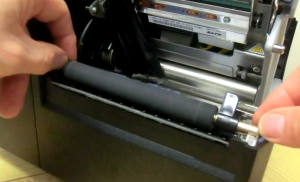
You can see it is coated in a layer of dust inside and out and the printhead was thick with black label and ribbon residue.  The platen roller (if you don’t know what a platen roller is – there’s a picture below) was also cut (never use a knife to get labels out of your printer).

Three reasons why you need a regular barcode printer service

  1. It will cost you more to replace the thermal printhead and platen roller.  Both will eventually wear out, but they can last twice as long if they’re looked after properly.
  2. Your once beautiful barcode label printer will produce labels that won’t scan if you don’t service your printer.  Labels that can’t be read are a problem because your customers will get angry when they can’t scan them at the checkout.*
  3. It’s very stressful.  Your barcode printer will stop working at the worst possible time – just when you need to print 10,000 labels.  You’ll be highly stressed telling your customer that their shipment can’t go out because you can’t print any labels.  You’ll be on the phone asking for an engineer to come out to fix your label printer right away and you won’t be having a good day.  A same day visit (if you can get one) will cost lots of money.

How to Avoid the Cost and Stress of Neglected Label Printers
If it’s been a while since you had your barcode printer serviced or even cleaned – you have a couple of choices – the dependable and the inexpensive options.

Dependable: book an engineer to come out and give your barcode label printer a service.  They will clean and check it and replace any parts that are worn or damaged.  See more here.

thermal printhead cleaning
Cleaning your thermal printhead is easy

Inexpensive: buy some alcohol cleaning wipes (we sell COSHH compliant packs of pre-saturated alcohol cleaning wipes in sealed packets) and get the vacuum cleaner to work.

Vacuum your printer out and clean the printhead and platen roller with the wipes.

Print a test label and check it for quality – there shouldn’t be any white lines appearing in solid blocks of print.  If there are – it indicates your printhead is wearing out.

Take a close look at the platen roller and check it for cuts or wear.  There’s a picture of a platen roller below.   Contact us if you need any help and we’d be happy to advise.  To find out more about our printer support options see our printer support page here.  We have an easy to use guide to cleaning your  barcode label printer – see it here.

Barcode Label Printer Service - platen roller
This is the rubber platen roller

*You probably won’t even realise your labels are unreadable until you have ten thousand products in the shops all with bars missing from the barcodes.  Perhaps buying an entry level barcode scanner to test scan every day might be a worthwhile investment?

Barcode and Label Design Software, BarTender by Seagull Scientific is 30 Years Old

Seagull Scientific bartender label design Software

BarTender is our favourite label design software package.  Not only is the software powerful and reliable, the support we get from the software developers, Seagull Scientific, is quick and knowledgeable. As it’s 30 years old this year, I wanted to take this opportunity to celebrate BarTender’s birthday with some birthday presents.

BarTender first appeared thirty years ago in 1987 as BarTender for DOS (if you remember what DOS was), making it probably the oldest, most stable label design program.  in 1987 Seagull Scientific were making barcode scanners and their barcode design software was a sideline.  In 1993 they launched a Windows version of their label design software and saw, for the first time, that year BarTender sales overtook hardware sales, prompting them to concentrate solely on label design software.

In 1994 Seagull developed windows printer drivers for thermal label printers, and to this day, have been the best alternative (perhaps a better alternative) to the printer manufacturers’ own drivers.

1999 saw Seagull Scientific become an international company, opening a European office – followed by a Taipei office covering Asia Pacific and another in Tokyo.  Another step into the big leagues was establishing a relationship first with Oracle then with SAP – and enabling their top end label edition to work with enterprise level ERP software.

Over the thirty years BarTender has been in development it’s seen 11 major revisions – adding the ability to print onto RFID labels, the addition of ID card printing and a host of incremental improvements for ease of use and stability.  Over the years it’s won numerous awards from various industry groups and associations.

12 Reasons Why You’d Want to Look at BarTender

I’ve chosen just ten features from the hundreds that make BarTender so powerful.  BarTender comes in four editions – Basic, Professional, Automation and Enterprise Automation.  Whilst you can use all of these features with the trial version of the software, not all editions enable all these features.  Talk to us about what you’re wanting to achieve.

  1. Connect your databases and spreadsheets directly to your labels – no need to key in product details into your labels.  Simply link your label to the database and select the products you want to print.
  2. Use a data entry form to simplify label printing.  Design a form, fill in the fields and print your labels.  Users won’t need to delve into label designs in order to print.
  3. Password protect your label designs.  Operators can still print, but they can’t accidentally change your carefully created label formats.
  4. Keep track of who’s printed what labels with the detailed usage history.
  5. Print directly from your iPhone, iPad or Android device with the BarTender Print Portal app.
  6. Automate your label printing – automatically print address labels in response to customer orders arriving on your website.
  7. Print from the cloud – use a web portal to print your labels.
  8. Print ID cards and RFID embedded labels – use BarTender with your ID Card printer or Radio Frequency ID enabled printer.
  9. Design labels quickly and easily – use the alignment tool to align text, or group objects together so you can move them around your label, rotate images, text and barcodes… I could continue.
  10. Print onto round, oval or rectangular labels.
  11. Reduce the number of label templates your organisation uses – massively. Using BarTender’s Intelligent Templates, large users of labels can organise their templates and reduce the number of templates used.
  12. Integrate with ERP systems – BarTender has direct support for corporate ERP systems including SAP, Oracle and IBM WebSphere with BarTender’s easy to use Integration builder.

BarTender Birthday Presents

As with any birthday – let’s talk birthday presents.

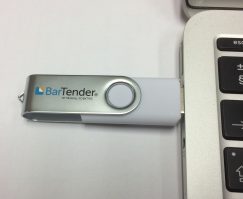
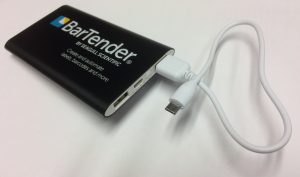
We’ve got some useful presents to give away: 8GB USB memory sticks and Power Banks to give your flagging smartphone battery a new lease of life.

Bartender 8GB USB memory stick
BarTender 8GB USB memory stick

Bartender powerbank portable phone charger
BarTender Powerbank Portable Phone Charger

We’ll be giving these away to the first four readers from the UK who test for themselves the latest version of BarTender.

All you have to do is download a 30 day trial of BarTender and email me to let me know what you thought to it.  Download the 64 bit and 32 bit versions by clicking here.

Sorry but we’re only giving these gifts to UK based readers.


The Labels Printers We Use and Why We Use Them

Not only do we sell barcode printers, labels and scanners we also print tens of thousands of labels each month for our customers. In this short article I want to share with you the hardware and software that we use in our business, and why we use them.

Printing labels.

We have three printers – a Zebra ZM400, a Zebra 170XiII and a Toshiba TEC 572.

Zebra ZM 400

Zebra ZM400 at Expert Labels
Zebra ZM400

This is our work horse printer. It’s a tough 4 inch wide industrial printer with a metal case and with a capacity for printing tens of thousands of label each day. It’s fast and it’s reliable. What’s special about this particular model is that it has a 300 DPI printhead. That’s certainly good enough quality for the print jobs we do. We’ve not been asked for very high resolution labels so 300 dpi has proved to suit our work. Usual printers are 203 DPI but our ZM400 prints high definition labels which can be used to present product labels and print small barcodes. It’s six years old and has given no sign of stopping.

Zebra 170xii

Zebra 170 XiII at Expert Labels
Zebra 170 XiII

What is special about this printer is that it’s 6 inches wide. When we have a choice we tend not to use it. Compared to the ZM400 it’s a little fiddly to load ribbons and labels. Once it’s set up it will print for days on end (and from time to time it does). The Zebra Xi series has always been Zebra’s top of the range printers and built for non-stop mission critical printing. We do have one particular job that requires six across labels and this printer is ideal. Six across labels means the output it 50% greater than the ZM400 – if we were using it every day it would pay for itself in no time, because it’s capable of printing more labels every second. In addition to having a very reliable printer, we also need the 170 XiII just in case somebody asks for a very wide label.

With a metal case, this is a very durable printer. On one occasion when we loaned it out to a customer it was dropped. Even though the case was bent slightly the printer has worked ever since. Despite it’s age (it is more than 15 years old) it’s still going strong.

The Toshiba TEC B572

tec-b-572
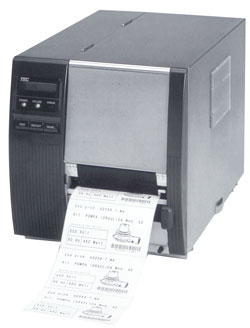
Toshiba TEC B-572

This printer is what’s called a near edge printer. This means that it copes very well with different thicknesses of media. It has a straight through paper path – in other words the labels come off the roll and feed straight under the printhead, through the platen roller and out the front of the printer. That’s useful when you’re printing onto thicker materials such as cardboard tags.

This printer is also a 300 dpi model. It too has a metal case.

It uses different thermal ink ribbons to the two Zebras – near edge ribbons, ribbons with a different composition of wax on it. That’s useful when a customer needs us to test ribbons for them. Not only that, the ribbons are 600m long, compared to Zebra’s 450m so on long jobs there’s less machine watching in case the ribbon runs out. With it’s Near Edge technology, the TEC 572 has “Ribbon Save”. The ribbon stops being pulled through the printer when there’s nothing on the label to print. With traditional printers, if you produce a meter of labels you use a meter of thermal ribbon whether you have text on the label or not. The TEC stops the ribbon moving when there’s no text to print on the labels. We don’t tend to use ribbon save because it slows the printer down – but if saving ribbons was important to us, we would.

This printer is getting on a little also. But with a metal case and available spares, it’ll give us years more printing without a problem.

Label Rewind unit

UR100 Rewind Unit
UR100 Rewind Unit

We couldn’t print longer runs without this handy tool. You switch it on, load an empty cardboard roll onto it, attach the first label out of the printer to it and switch it on. It takes up the tension and waits for more labels to print. As the printer feeds out labels it re-winds them onto the roll. As it’s an external rewind unit, it has a separate power supply and sits on the desk at the front of the printer. This is useful for us, because we can use it with any of the printers we have. Before we bought this unit, we’d sit for hours laboriously rolling labels onto rolls.

Label Design Software

Seagull Scientific Bartender

We’ve been using Seagull Scientific’s Bartender label design software for years.  It’s powerful and fairly easy to use.  Because we can find ourselves using it for a wide range of different jobs we need something that’s flexible and powerful.  There’s lots that’s good for example serialisation – you can have number sequences, letter sequences, specify how many numbers/letters the sequence jumps.  Bartender handles GS128 barcodes well.  GS128 barcodes are the large barcodes that you see on pallets and outer case labels.  It’s a barcode that encodes best before dates, lot numbers, pack sizes, manufacturing dates – the list goes on.  Without Bartender managing those “application identifiers”, printing GS128 barcodes would be much more difficult.  Another benefit is the ability to program the software.  One project saw us printing very complex labels.  The label included printing from databases and adding a roll identifier (a label that told the user what range of numbers was printed on the roll).  Bartender also allowed us to print in reverse order so the last label printed was the first label in the sequence.

For advice and ideas for using Bartender, call us on 01359 271 111.

A Close Look at Sato’s CL4NX Super Printer

We’ve been working with thermal label printers for more than two decades and just when I say barcode printers are about as easy to use as they can ever be  – I end up eating my words.  Take a look at the Sato CL4NX Thermal printer.

The Sato CL4NX thermal label printer can only be described it as the most powerful, versatile label printer I’ve ever encountered (so far). They’re not cheap but the build quality is very reassuring and you can do so much with these printers.

Let’s look at what makes this printer what it is, starting with the ordinary bits.  It prints labels up to 104mm wide (four inches).  It prints at a respectable 250mm per second. Like the Zebra ZT printers, it has a bi-fold side door so it fits into small spaces.

What Makes the Sato CLNX Printer so Special?

Ten interesting features that you’ll find on the Sato CL4NX printer, but the last one is the best.

Watch Videos on Your Printer???

Play Videos on your Sato printer

1.  Full colour display – to the point where you can play videos on this printer.  If members of staff (or contractors) need to know how to change ribbons or clear a fault, you can play the video on the printer and watch, step-by-step, to see how to do various tasks. This is probably the most striking part of this printer.

The Sato CL4NX Thermal Printer’s Got a Mouth Like a Hippo

Easy access printhead for cleaning

2.  It’s got the widest opening printhead I think I’ve ever seen on an industrial printer.  Now that might sound quite geeky, but when you need to clean a printhead, ease of access makes the job so much easier. I’ve never seen an industrial printer open up as wide as this.

A Printer that Talks to Your Phone

3.  It uses NFC (near field communications) – you can read or write the printer configurations by simply waving your NFC enabled phone in front of the printer. That’s pretty handy if you’ve got 10 of these printers you want to reconfigure.

The Sato CL4NX’s Simple Sticky Pad

Handy Ribbon Take up spool sticky pad
Sticky pad makes changing thermal ribbons easier

4.  Other small, but very useful features include a small sticky pad on the ribbon take-up spool. Sounds pretty insignificant but unlike with other printers, there’s no need to wrap the ribbon around and around and hope that friction will keep it in place.  With the Sato you simply stick the end of the ribbon to the white pad, give it a turn and it’s ready to start printing. On the subject of ink rolls, there’s no cardboard take up spool that you find with many printers,  so the spent ribbon material simply goes into the recycling bin – no mixed recycling irritations.

No Need to Cut your Printer

The Sato CL4NX Thermal printer's platen roller change
No tools needed to change platen roller

5.  No tool platen roller removal.  This printer comes with a platen roller that can be removed without any tools. When you find an adhesive label gets wrapped around the platen roller,  instead of needing to call out our engineers or damage the roller cutting the label off with a knife, all you do is press a button and you can lift out the platen roller for easy cleaning.

Sato CL NX’s Connections

Lots of connection options with the Sato CL4NX Thermal printer
Lots of connection options

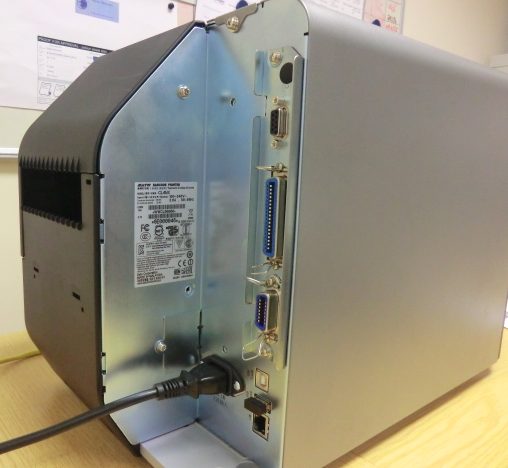
6.  Plenty of connections.  This printer has Bluetooth, USB, serial, parallel and network connections as standard.  Including a USB socket (for a keyboard) on the front of the printer.  The only optional extra you pay for is Wi-Fi.

The Printer that Remembers Where it Left Off

7.  As with most printers it comes with a real time clock so even though the print job has been sent to the printer with time and date set at print time, it updates as printing progresses. Might not sound important but if you’re using a peel and present feature on the printer and the printer is pausing every time it prints, there can be quite a delay before the label is printed.

Longest Lasting Printhead in the Business

8.  Another advantage this printer has over it’s major rivals is a super long life printhead. This printhead is made to last twice as long as the competitions printheads, but with the same price.


The Sato CL4NX Thermal printer's extra large label roll capacity
Extra large label roll capacity

9.  This printer has an optional 10 inch roll holder.  Normal printers take rolls that are eight inches in diameter.  This one can use rolls with a 10 inch outside diameter. That means you get a whole load more labels on your roll and that, in turn, means you don’t have to change rolls so often – giving you less downtime.

The last and perhaps most powerful feature is AEP – Sato’s Application Enabled Printing. This powerful programming language makes full use of the printer’s colour screen, takes advantages of scanners, weigh scales and Bluetooth and USB keyboards to give you a fully stand-alone printer.  With AEP you can have bespoke applications written – customised to your organisation’s processes – and prompt users to enter data, validate the information and print.   In fact it so versatile it’s able to search the web for information.  The application we had on our Sato CL4NX Thermal printer had a barcode scanner read a book’s ISBN barcode then the printer went off to the internet,  look up what the ISBN Book title was – along with a summary of the book – and printed it on label.

In Summary

AEP makes the Sato CL4NX Thermal printer a very versatile printer.  The host of convenient features, such as wide opening printhead and the sticky pad for loading the ink ribbon make this an extremely usable printer.  Sato have given this printer a lot of thought.

Want to see Sato’s CLNX Printer For Yourself?

If you’d like to see more – perhaps get your hands on the Sato CL4NX label printer – visit our contact page and get in touch.  We’d be delighted to talk you through it’s  features and arrange for you to see one.

The Versatile Loop Lock Label

A Label that’s not a Label – it’s a Tag

Most people call them loop lock labels but you might have seen them described as self tie loops, luggage tags, handle ties, self tie tags, wrap ties – even label loops.  They all do the same thing – they’re a tag without adhesive that you loop round on itself and attach to an item.  Technically they’re a label – because they identify something – but without any glue they’re not strictly loop lock labels.

Loop Lock Labels

A Tag with a Thousand Uses

These are the tie on tags you see most often on trees and plants, but a more innovative use included one caravan park that tied a different coloured label onto the caravan door handle to indicate which day the caravan needed to be cleaned.  Other uses include turkeys, bread crates and laundry baskets – there must be tens of thousands of possible uses. Once you’ve seen this, you’ll realise how versatile these tags are.  Certainly we’ve supplied them to steel tubing suppliers and abattoirs but most often to plant nurseries or garden centres.

Loop Lock Labels – Choice of Materials

What makes this tag so versatile? One reason is the material they’re made from.  They’re versatile because they can be made from low cost paper, waterproof and durable plastic, tear and scratch proof plastic, heat resistant plastic and tear proof tyvek. What’s more, if you use them in food production, you can get your tags with metal content, so they can be detected by metal detectors (avoiding the PR disaster of having your tags turn up in your customer’s food). Finally, most of these tags are 100% recyclable.

Choice of Printing Onto Your Tags

The other feature that makes them so versatile is how they are printed. Most of our clients use thermal printers because they’re fast, reliable and cheap.  However, many of our garden centre clients print full colour Loop Locks using laser printers and of course there’s still a sizeable number who use the trusty pen. If you need to print full colour loop lock labels – visit our contact page, get in touch and ask about our sheet loop lock label supplies.  If you’re printing thousands, let us print your tags with your logo and message whilst you overprint them with product and price information.

Loop Lock Labels Come in Dozens of Different Shapes and Sizes

Another versatility plus is that these tags come in a huge range of different sizes. In our stock range, choose from eight different colours or have your own logo printed onto the tag. We can even print your labels for you.  Include a perforated tear off section for prices or codes.

Be Warned

Loop Lock Labels come in a fairly small range of standard sizes.  Whilst you’re able to make tags any size you’d like, new tag sizes will cost.  People usually buy plastic tags and cutting dies for plastic materials are more expensive than paper.  Adding perforations and unusual cuts will put up the cost.  Click through to our Loop Lock Label page and see what standard sized tags are available.

If you have a thermal printer, these tags are made to fit any 110mm wide thermal transfer label printer that’s big enough to take a 8 inch roll of labels (i.e. a printer that’s larger than a desktop printer).

Whilst they’re a really easy way to quickly label trees, bushes and shrubs, don’t forget they can be used to tag all sorts of other things. You can use these tags to identify cables, furniture, tools, shelf racking, steel bars, computers – in fact many kinds of assets can be labelled with loop lock labels and tags.

If you need to clearly tag something, Loop lock labels might be the answer.  Call us on 01359 271 111 or email the team at info@expertlabels.co.uk

Zebra’s New Baby Printer the Zebra ZD410

Zebra ZD410 2 inch wide label printer

No, Zebra Inc haven’t developed technology to print babies – but they have launched the new Zebra ZD410 – the baby in their range.  It’s the smallest desktop label printer Zebra make, replacing the long serving Zebra LP2824. Here’s our short review of it:

What’s so special about the Zebra ZD410?

  1. It’s small. Did I mention that already? So small that it will fit on any desktop or counter.  Perfect when size really does matter.
  2. It’s fast – up to 150mm (six inches) per second.
  3. Wide opening Zebra ZD410 Label Printer.It’s easy to use – it’s direct thermal so there’s no ribbon to change. – Look how wide it opens.
  4. It’s got a lot of cabled and wireless connections. Choose from USB, Serial, Wifi, Bluetooth and Ethernet.
  5. It’s multilingual (in printer terms) – speaking the printer language of it’s rivals. That means it can directly replace rival brands.
  6. You can plug an Zebra supplied keyboard/display unit into the printer, which you can use (after downloading a label format) instead of a computer.
  7. It has a movable gap sensor – which means you can print dumbbell labels, labels with notches at the edge and labels with off centre blackmarks.

It’s a shame it doesn’t use the ZBI 2 programming language, but it’s an entry level printer – and an extremely capable one at that.

Use the Zebra ZD410 for printing labels, tags and tickets that have a relatively short label life, due to the printers Direct Thermal capability.  By short life, it lasts months rather than years and certain thermal labels will discolour in the sun or if exposed to heat.  Ask us for some test labels if you’re unsure.

Another thing to note is the print width – just 56mm or 2.2 inches.  Don’t let the size limit you, we supply a wide range of labels that will fit the ZD410.

For pricing or if you have any questions on how you can use it, click through to our contact page and get in touch.  We’ve been working with Zebra printers since 1994 so there’s not much we’ve haven’t seen.  Want more information now?  Download the full spec sheet here.