Last weekend, when the sun finally made an appearance, I was out in Runnymede, Surrey with my family when I suddenly spotted a sign at the National Trust selling Criterion Ices! We have been printing labels for Criterion Ices for the past 6 years and it was great to see their delicious ice creams on sale so far from their Suffolk roots.
If you need barcodes or short run labels like Criterion Ices, please contact us. If you are lucky enough to see their ice cream on sale, have a coffee one … they’re awesome!
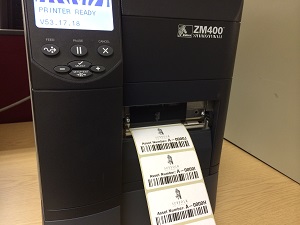
Congratulations on choosing a thermal barcode printer. You’ve chosen the most reliable technology for printing high quality barcode labels. Thermal printers will give you years of trouble free printing, at a cost below what a laser or inkjet can achieve. That said, if you follow these simple steps to care for your thermal barcode printer, you will extend the life of your printer and avoid faulty labels and barcodes that don’t scan.
All thermal printers use printheads. Thermal printheads cost hundreds of pounds, rising steeply in price if you have a high resolution or a wide printhead. Many people don’t realise they wear out and need replacing. The printhead is one of only a couple of parts that need care on your printer. Read on and learn how to care for your barcode printer.
How to care for your thermal barcode printer.
Here are eight things you can do to care for your thermal barcode printer and save money.
Run your printer at the lowest acceptable temperature or darkness setting.
Clean your printhead every time you change ribbons (or in the case of thermal labels, a roll of labels). I know that sounds tedious, but with an alcohol cleaning wipe, it’ll only take a few seconds. Contact us and we’ll send you out some complimentary printhead wipes.
Cleaning your thermal printhead is easy
Reduce printhead pressure. With small desktop printers, you don’t have that option, but with larger industrial printers, there are thumb screws that allow you to reduce the printhead pressure.
Adjusting a thermal printhead
If you’re using thermal ribbons, make sure they’re wide enough to cover the whole width of the labels you’re printing.
Slow your print speed. The slower the better.
Test different thermal printer ribbons. Different formulations of ribbons can give great print results at a lower temperature – leading to longer thermal printhead life. Contact us and ask for some sample ribbon for you to test.
Never take a knife or screwdriver to your printer. If a label gets stuck, use isopropanol alcohol to clean the label off. Sharp objects damage printers – and will end up costing you money.
If you’re using an industrial sized Zebra printer, ask us about their extended life printheads. Zebra claim they’ll last twice as long as a standard printhead. Contact us to check if your printer can take one of these printheads.
Are you looking for barcode labels, batch labels, product serial numbers or just product labels?
Sometimes having someone else do your barcode label printing makes good business sense. Save buying printers and software and have us print your short run label jobs.
Let’s get to the point – we want to help you print your barcode labels. Please read about our label printing service below, but…
If you want to get prices for barcode labels, click the Get Prices button below:
And, if you’re unsure about anything and you’d like quick, expert advice on getting your barcode labels printed, phone 01359 271 111 or email us at sales@expertlabels.co.uk.
Otherwise, read on and learn about our barcode label printing service.
More than just Barcode Label Printing.
We work with our customers to provide:
Barcode labels
Text or Number only labels
Lot number labels
Batch numbers printed onto labels
Serial number labels
Postage labels
ID labels for assets
Complex sequentially numbered labels
Labels from databases or spreadsheets
If you know what you need, get prices here. Have some questions? Scroll down to read our guide, or talk to one of our experts – call 01359 271 111, or email us now at info@expertlabels.co.uk
124 Different Label and Tag Materials and More than 6,000 Sizes.
Not only do you expect us to do your barcode label printing, but we also make sure the labels and tags meet some pretty high standards too.
Huge Cutter library
In addition to standard paper labels, we’ve got decades of experience of barcode label printing to more difficult materials. You can have:
Tear resistant tags
Fan-folded labels
Outdoor and plant labels
Scratch resistant labels
Heat proof labels up to 500 Deg C
Cryogenic labels (down to minus 176 Dec C)
Multi-part labels – that allow part of the label to be peeled and applied elsewhere
Tamper resistant and tamper evident asset labels and
Coloured labels of all kinds.
Not only do we print onto these different materials, we also ensure the inks we use remain durable and legible under very demanding conditions for the life of the label or tag. Our barcode printing service to you includes checking and guaranteeing that the label or tag will work with the thermal ink it’s printed with.
Choose From More than 97 Barcodes.
When it comes to barcode label suppliers, you can choose from dozens of different barcode styles – such as:
QR Codes
Code 128
Code 39
ITF 14
UPC A & E
EAN 8 and 13.
But if you need some of the more obscure barcodes – we can help:
CDs and DVDs
PDF417 codes
Code 49
Codabloc
IATA 2of 5
ISBN book codes
JAN 8 and 13 Han Xin codes
Aztec codes.
We work with 97 different barcodes (and that number rises every time a new barcode is introduced). We can print all the postal and shipping codes, pharmaceutical and healthcare and GS1 specified barcodes for you.
Complex Printing Solutions is Our Speciality.
Our clients use us for complex printing work, using check digits and special roll labelling through to simple incremental serial number labels. Perhaps you need sets of numbers? We print pairs, 3s, 4s – any number of labels.
Case Study – Our customer wanted to order barcode labels with a complex Luhn algorithm check digit included in the barcode. They also needed the labels printed in reverse order, so the last label printed in the sequence appeared first on the roll. To complicate matters further, a ‘header’ label identifying what numbers had been printed onto that roll was needed at the beginning of each roll.
We were able to create a database that included the check digit and built it into the number sequence, then, using our very powerful label design software, we wrote a custom script that printed the labels on our 300 dpi printer and use our label rewinder to meet the exact standards our client wanted.
Database Connections.
We extract data from a wide variety of sources to print onto our customer’s labels and tags – in fact we work with 11 different file formats – including Comma Separated Variables (CSV), Text files, Excel, MS SQL Server and Access database files, but also some of the less common ones – such as SAP Intermediate Docs (SAP iDocs), OLE DB, universal data link and ODBC.
Production Times.
If you have simple requirements we can often find a label off the shelf and have your labels printed in hours (read this story about how we turned around a label in hours). For more specific needs we have access to a choice of tens of thousands of labels and tags – ready for production in a few days. For very precise and unusual projects, we can usually get the finished labels out to you in around two weeks.
Choose the material (paper or plastic) and size of label you need.
3.
Enter what you want printed on the form, upload any artwork and upload a database or spreadsheet.
4.
We receive a copy of your order. If we don’t understand something, we’ll contact you to clarify.
5.
We print a label proof and send over an image of the label for you to approve.
When we get confirmation you’re happy with the label, we start printing. We check the quality of the barcode label printing services at the beginning and throughout the printing job. We have barcode scanners that we use to ensure the codes are readable and that they are encoding the correct information. If the job is a long one, we’ll use our label rewind unit to roll the printed labels onto cores.
Barcode Label Printing
6.
Finally we check the labels for quality once more and package them for our courier to deliver to you.
Your Guarantee.
Our label and ink combinations are checked in a laboratory to ensure they remain legible and stuck for the specified life of the label. We guarantee to replace any labels that fail to meet these standards. Ask us to specify the label life when you order.
What’s Next.
Our service team have been expertly barcode label printing since well before the turn of the century. In fact, we are one of the few barcode label printing companies with over 25 years of experience. We would be happy to talk through your ideas to see if we can help.
Tell us about your labelling project on 01359 271 111, or email us now at info@expertlabels.co.uk and see if any of our label printing services can help.
At Expert Labels we supply labels for breweries, food and drink, cosmetic businesses and more. If you already have the design you want for your labels, but want to add silver or gold foil, unique patterns of gloss or matte varnish or other textures, we’re the people to call. Use the latest digital label printing technology to make your label stand out from all the rest.
Not all designers can take advantage of all the opportunities these label features offer. We can show you how you can use these embellishments can take your products to the next level, boost sales and be the envy of your competitors.
Ask us to give your label the beauty treatment and become the talk of your industry.
If this sounds like something that you are looking for, give one of our Experts a call today on: 01359 271 111 to discuss your design ideas. Alternatively, you can fill out the form below and we will contact you.
Essential cookies enable basic functions and are necessary for the proper function of the website.
Name
Description
Duration
Cookie Preferences
This cookie is used to store the user's cookie consent preferences.
30 days
Google Tag Manager simplifies the management of marketing tags on your website without code changes.
Name
Description
Duration
cookiePreferences
Registers cookie preferences of a user
2 years
td
Registers statistical data on users' behaviour on the website. Used for internal analytics by the website operator.
session
Statistics cookies collect information anonymously. This information helps us understand how visitors use our website.
Name
Description
Duration
tk_tc
WordPress.com analytics cookie used to track user consent and cookie preferences
Session
tk_ro
WordPress.com analytics cookie used to track returning visitors
12 months
tk_rl
1 day
tk_ai
WordPress.com analytics cookie used to track unique visitors
12 months
expertlabels-_zldt
1 day
expertlabels-_zldp
WooCommerce SourceBuster cookie used for order attribution and tracking visitor source
1 years
_hjTLDTest
Session
_hjSessionUser_493747
12 months
_hjSession_493747
Hotjar session tracking cookie
30 minutes
SourceBuster is used by WooCommerce for order attribution based on user source.
Name
Description
Duration
sbjs_session
The number of page views in this session and the current page path
30 minutes
sbjs_udata
Information about the visitor’s user agent, such as IP, the browser, and the device type
session
sbjs_first
Traffic origin information for the visitor’s first visit to your store (only applicable if the visitor returns before the session expires)
session
sbjs_current
Traffic origin information for the visitor’s current visit to your store
session
sbjs_first_add
Timestamp, referring URL, and entry page for your visitor’s first visit to your store (only applicable if the visitor returns before the session expires)
session
sbjs_current_add
Timestamp, referring URL, and entry page for your visitor’s current visit to your store
session
sbjs_migrations
Technical data to help with migrations between different versions of the tracking feature
session
Marketing cookies are used to follow visitors to websites. The intention is to show ads that are relevant and engaging to the individual user.
Facebook Pixel is a web analytics service that tracks and reports website traffic.