All posts by Miles

BarTender Cloud

BarTender Label Design & Print Software

BarTender is one of the top two world-leading label design and print software suites – trusted by over 250,000 companies globally to design, manage and automate barcode labels, RFID tags, cards and more.

With powerful design tools and flexible printing options, BarTender is ideal for businesses of all sizes and industries that need robust, accurate, and legally compliant labelling solutions.

Powerful Label Design

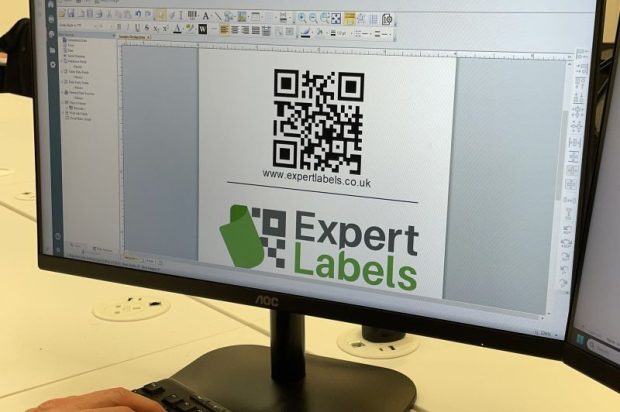
BarTender Label Designer

BarTender makes creating professional labels fast and easy. You can design labels from scratch or choose from a large library of pre-built templates to help you meet industry standards and regulatory requirements.

Intelligent design tools help you to auto-populate data fields, link directly to data sources and reduce design mistakes.

Centralised Control & Workflow Standardisation

Whether your labelling operation is local or spread across multiple sites or even countries, BarTender lets you centrally manage your label templates and workflows. This ensures consistency in design and printing, improves compliance for audits, and reduces costly mistakes in production.

Comprehensive Printing & Integration

Mobile printing with BarTender

BarTender can print to thousands of different makes and model of desktop and industrial label printers.  Added to desktop computers, BarTender users can design and print labels from any browser based device including phones and handheld terminals.

BarTender also integrates with your business data through ERP, databases and spreadsheets.  With access to a single source of data BarTender ensures integrity and enables you to automate business processes reducing the cost, improving efficiency and reducing errors. 

Editions to Suit Your Needs

BarTender is available in multiple editions ranging from Starter through Professional, Automation and Enterprise, allowing you to choose the right level of functionality – from simple label design to fully automated, centrally managed labelling systems.

Why Choose BarTender?

  • Fully cloud based or On-Premise versions
  • Powerful, flexible design tools with compliance-ready templates. 

  • Centralised management for multi-site consistency. 

  • Integration with back-office systems for automated workflows. 

  • Supports standard and advanced barcodes, RFID and legal requirements.

  • Range of cost options

Get a free 30-day BarTender trial

Click this link and download a fully-featured 30 day trial or speak to one of our experts to find the right BarTender edition for your business.

Bartender Allergen Hack

Are you struggling to design labels that meet the EU’s Food Information Regulations?  Is the need to highlight potential allergens giving you a headache?  World leading label design software, BarTender by Seagull Scientific has a handy hack that will mean your list of ingredients can be created easily and automatically with the allergen’s in bold.  Read on to find out how.

The EU’s Food Information for Consumers Regulation states:

“The allergenic ingredients need to be emphasised using a typeset that clearly distinguishes it from the rest of the ingredients, for example by means of the font, style or background colour. Food businesses can choose what method they want to use to emphasise the 14 allergens on their product label.”

That’s simple enough when you’ve got a few labels to print – but how do you do it when you’ve hundreds of label designs?

How to design labels with Allergen’s highlighted

Download the step by step instructions

Download the files you need

Useful links

What needs to appear on a food label

UK Government Food Labelling regulations.

Over printing services

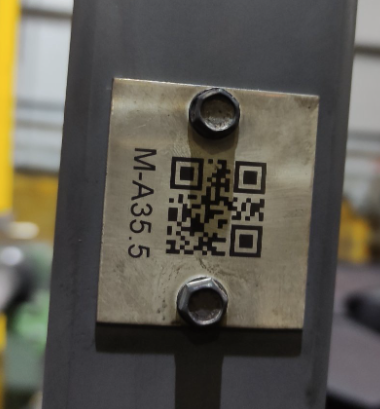
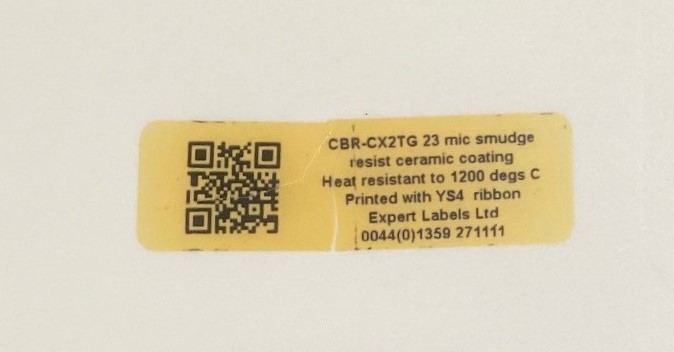
1000C QR code tag

Print Your Own High Temperature Labels

This is how to print high temperature labels – able to withstand temperatures from 200C to 1,250C – in house using your own printer.  You’ll learn what label printing hardware you need, the type of thermal ink ribbon and the label design software you need to design your labels. 

  • Printer compatibility
  • Ink selection
  • What can you print?
  • Label design

Label Printing Hardware

Use a thermal transfer printer

The labels we supply need to be printed using a thermal transfer printer.  Thermal printers are made by Zebra, Sato, Honeywell and a host of other brands. 

These printers are specially designed for label printing.  They are fast and extremely reliable.

Thermal Transfer printers use a roll of ink ribbon that melts onto your label.  They are single colour – depending on the colour of the ink ribbon.  99% of the ribbons we sell are black, but can come in other colours.

Thermal printers range in price from £500 to £1500 depending on how big, fast, durable and flexible they are. 

Ink Selection

Ink ribbons for standard high temperature labels (sub 400C) come in three lengths – 74m, 300m and 450m – depending on your printer. 

These ribbons are made from resin and come in boxes of at least six rolls.  It is possible to get different coloured ink ribbons – though there are quite high minimum order quantities.

The ultra-high-temperature labels (designed to withstand temperatures up to 1250C) need a specialist ink.  These are only black and come on rolls of 300m.  This makes them compatible with all industrial sized printers and many of the desktop models.

Ultra-high-temperature inks are more expensive than standard ribbons and come in units of single rolls.

Thermal Transfer Ribbon
Use a thermal ribbon to print your high temperature labels

Are There Any Limitations About What I Can Print?

You are limited to printing just one colour – usually black.

You can print standard linear barcodes, QR Codes and other 2D barcodes.  You can print logos and text.  Depending on your printer resolution, it’s possible to print text down to around 5 points size.

Depending on your label design software, it’s possible to print any font or language.

Each of your labels can be unique.  Serial numbers and date codes can be included.

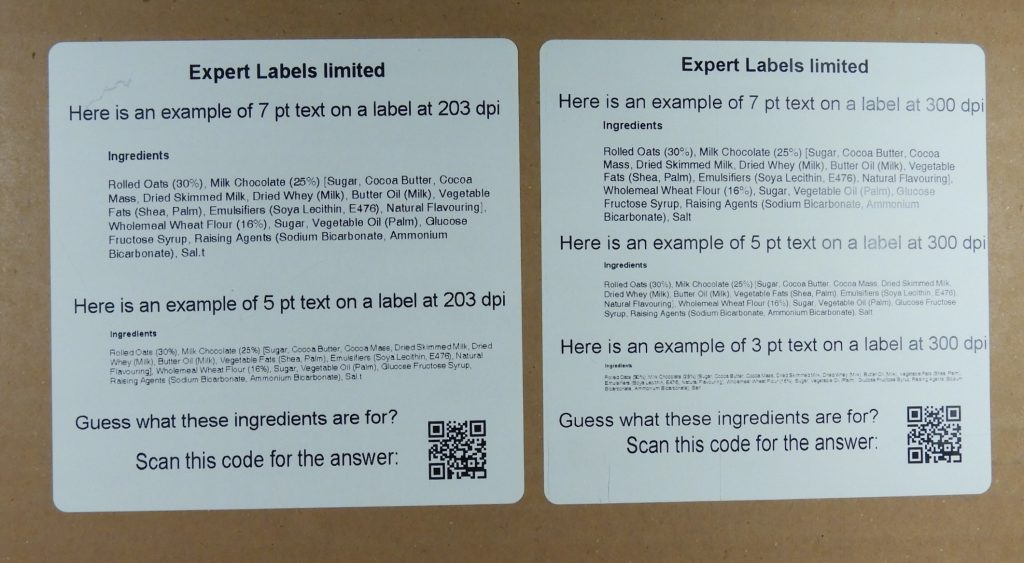
Thermal label printers range in print resolution from 200 dpi to 600dpi.  Most printers are 200 or 300 dpi.  300 dpi printers produce images of good resolution acceptable for most industrial uses.


Example labels printed 203 and 300 dpi
Examples of 203 and 300 dpi labels

Designing Your Labels

Labels can be designed by you, using label design software from Zebra (Zebra Designer), Seagull Scientific (BarTender) or Loftware (Nicelabel). 

These programmes can design labels with barcodes, text, and graphics.

Using this software, you can link to databases – from Excel to SAP and Oracle. 

Check our guide to label design software to see the full range of capabilities.

Page updated: 11 Jun 24

BarTender Cloud

BarTender Cloud – The Next Generation of Label Design

Seagull Scientific, the name behind the industry leading BarTender label design software, have been on a journey. Several years ago they realised they needed to set up their best selling label design software to operate in the cloud.  Like other SaaS providers, Seagull decided to charge ongoing subscription charges rather than one off outright purchases.  Their journey started with charging an annual maintenance charge on software purchases. The next step – in competition with their rivals was to create a proper cloud based solution.

Read on to see what’s so special about BarTender cloud, but first a little background.

In September last year we were invited to train to be BarTender Cloud resellers – with the launch of their new cloud product.

A couple of months later BarTender Cloud was further improved with the addition of the label design component.

Now BarTender cloud is a fully fledged cloud based label design application.

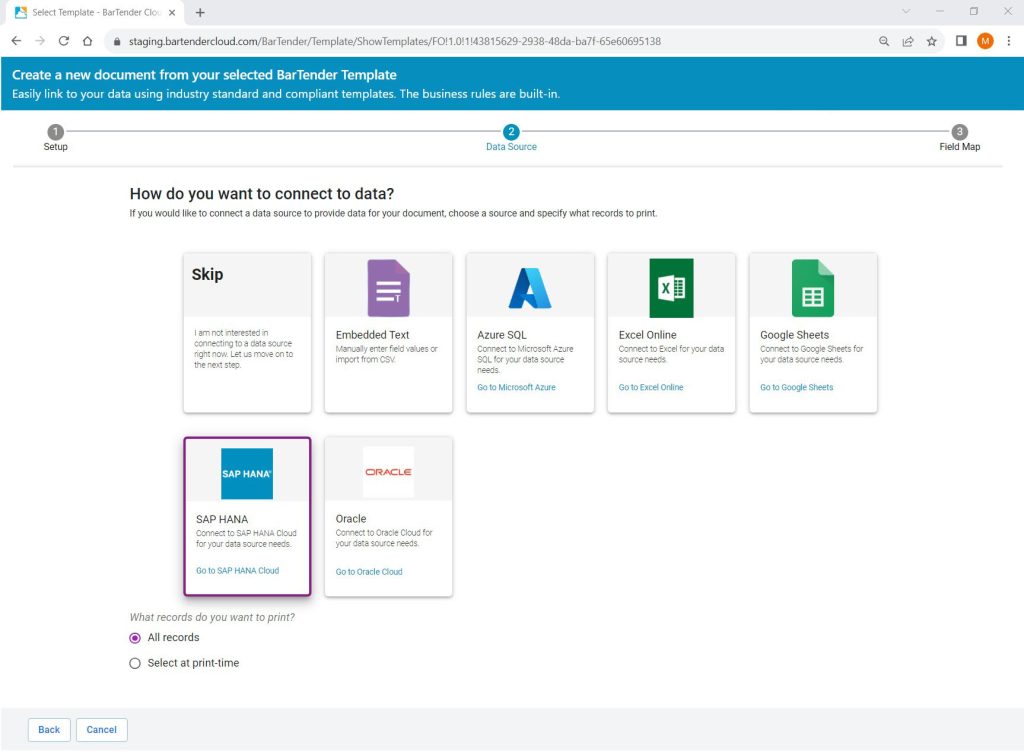
Range of databases to connect to BarTender Cloud

So What is BarTender Cloud?

If you’ve used any other label design app, then BarTender cloud works just the same – you choose the label dimensions and add elements to the design, like barcodes, text, images and so on. 

BarTender Cloud is the same as the desktop app – except with a few added features.

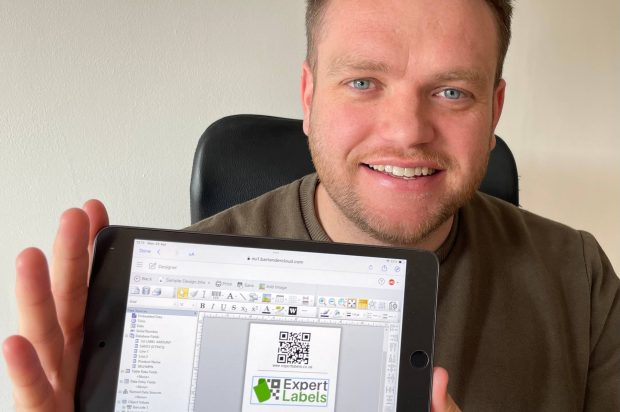
Ability to design labels from your browser

Any browser. A browser on a tablet, a Mac (something BarTender didn’t previously do) or a PC. 

If you want to print labels from your mobile device, that’s possible (though it isn’t easy to design labels).  Use BarTender’s printing app for iPhone and Android.

Shared library of label templates. 

Using the template library you can choose from hundreds of designs that experts have made for you – you just tweak it to meet your needs.

Not only do these save you time, but these designs comply with the rules of your industry. Filter the ever growing set of templates by industry or compliance standards.

You even get the required logos and industry specific barcodes.

Easy to get design expertise to help you.

No more sending files back and forth – simply ask your design expert to log on and design your label for you. (Let us help you with your cloud label design).

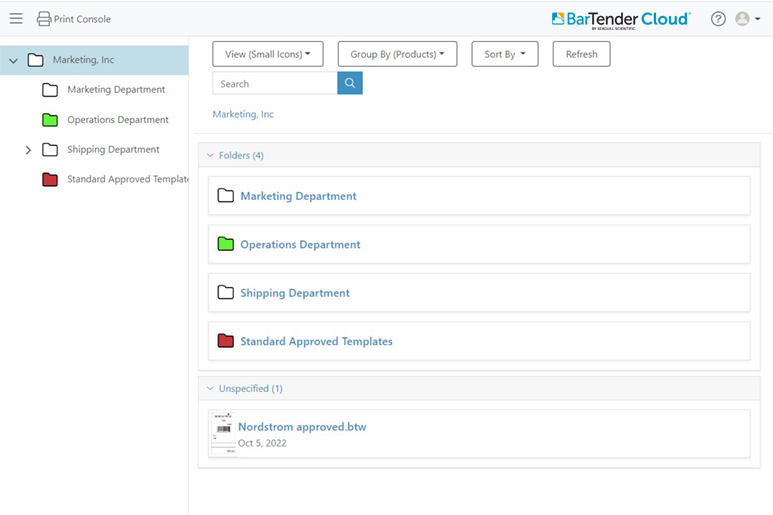
Centralised library of label designs.

In the past you needed to buy BarTender’s Enterprise edition if you wanted a centralised library of designs. Now you have that with BarTender cloud. 

You can set access permissions – allow groups or users the ability to just print – or perhaps they can edit but not delete. 

Retire old designs to a ‘retired designs’ folder and only give certain users access to the current designs.

Folders in BarTender Cloud
Shared folders of label designs

Reduce Support Costs

No need to install software and support the software on your own servers.  This is all handled by BarTender Cloud.  Expert support can be provided quickly and easily by BarTender specialists such as ourselves – without us needing to be on site or needing access to your server.

Easily Share Label Printing

Have your manufacturing partners – in other countries – print your label designs on their printers.

Integrate

Using the Automation version of BarTender Cloud, you’re able to connect your label designs to Excel online, Google Sheets, Oracle,  Microsoft Azure and SAP. 

Just like the desktop version of the software, you establish a connection to your data source and link the elements of your label to the fields in your database. 

Now you can capture data from across your organisation and feed it into your labels – one source of data for every label. 

BarTender Cloud has prebuilt connectors so you can connect without the need for coding skills.

Print-driver free printing

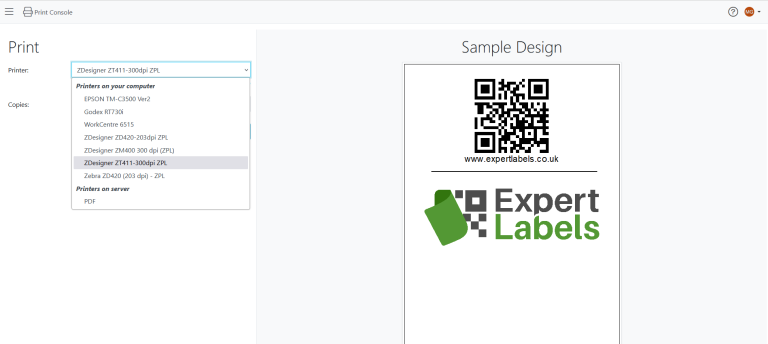
BarTender Cloud Printer Driver

With BarTender cloud, you no longer need to have drivers for your various printers.

BarTender Cloud will auto-discover your local and network printers and automatically print using one of nearly 8,000 Seagull Drivers specially made for thermal label printers.

BarTender Cloud Pricing

BarTender Cloud comes in two versions – Automation and Essentials. 

Essentials lets you design labels and create data entry forms for your labels.  You can connect to databases and you can print to any number of printers.

Automation gives you the ability to store more data – up from 2GB for Essentials to 5GB, call upon more data integrations options and a higher level of support (i.e. live chat and phone).

Interestingly, Seagull are charging based on the number of labels you print each year.  Prices start for printing 10,000 labels and go up to over 250,000.

BarTender Cloud is charged on an annual basis with an initial ‘provisioning’ fee, which includes training to get you up and running along with two label designs made for you.

For exact costing, contact us here for an up to date price.

Try Before You Buy

Taking BarTender Cloud for a test drive is easy.

Click on this link

Complete the form and you’ll get access to trial period of BarTender cloud.

Useful Links

Useful BarTender related links:

See our guide to label design and printing software.

BarTender training

Last updated: 9 May 2024

How’s Business?

Graph of business performance

At the end of August 2023 I asked people on our mailing list ‘How’s Business’.  These are a selection of answers I got:

We are not experiencing a downturn, actually, we are looking at expanding our production capacity this year. Our company increases its revenue and profit each year.

Of course, we saw some decline due to the cost of living crisis, energy prices and general war issues in Ukraine. But nothing stopped us producing and shipping the products to our customers.

– Multinational Electronics Manufacturer

And

We are currently busy here at present, we are just re-starting after our 2-week shut down.

Our labels are mostly used on out of spec products and broken-down machinery which is something we do not really want a lot of, therefore that is why we don’t use that many labels, we like to keep these figures down.

– Multinational Metals company

And

Our volumes have actually been pretty stable this year against last year, but definitely down from where we were a couple of years ago. One thing we’re trying to put in place that is definitely having a knock on affect onto our suppliers is reducing inventory, where over the pandemic and Brexit we held a lot of strategic stock to mitigate risks, we are now trying to wind that down to a more responsible level, which obviously means to suppliers it does look like our consumption is down in certain areas!

– Multinational Electronics Manufacturer

And

We are experiencing a full capacity plus in our workload, which is hard work, but very welcome.

– Electrical engineering

And

As of yet we haven’t seen a decline in business, but I suppose we aren’t the best to gauge the industry off as we are a fairly new business who are still contacting and sampling new customers all the, like I said our business is going from strength to strength at the moment.

We have heard though that the construction industry as slowed down a little over the last few months, but only this week after speaking to some of our customers they are optimistic about the coming months as they have a lot more work booked in their diaries.

– Building Materials Manufacturer

And

Business is OK, but the poor summer weather hasn’t been good for sales of outdoor products.

– Bathrooms and furniture retailer

And

We are working at 100% plus at present. We have been busy now for a number of months. I know the CBI surveys say orders are still rather low, but things have improved over the last 12 months.

– Electrical engineering

And

I would say we are the reverse, probably around 30% up on last year and therefore so are our customers.

It took off at the beginning of the year and has kept at a pretty steady raised level so far.

We don’t do much in the FMCG area which may be the reason.

– Packaging Company

And

Our shipments are down, partly because we’ve lost a major customer due the Russian invasion of Ukraine.

I’m also told we’ve “shot ourselves in the foot” with voting to leave the European Union, (although I voted remain, so my conscience is clear).

– Engineering

About Our 'How's Business' Survey

Our ‘How’s Business’ survey is by no means scientific.  It’s skewed towards manufacturers and email respondents may be biased, but it gives you an idea of business confidence and what they’re experiencing. 

Struggling Business in the News.

Widely report in the UK media today has been news that July, August and September saw the worst figures for business failure since 2009. 

For us, construction companies aren’t a large market for us, but failures in the construction sector are up 46% on the previous quarter, according to UK government figures.

Overall, in the last quarter, 52 companies per 10,000 went out of business.  That compares to 47 in the previous quarter.

Two quarters statistics don’t tell us a lot about how’s business generally but,  if the trend continues, the buoyant labour market we are experiencing might be the next to suffer, if business failures continue as they have.

Useful Links

Reduce Labelling risks

Reduce the Risk of Labelling Mistakes – Part 2

Reduce Labelling risks
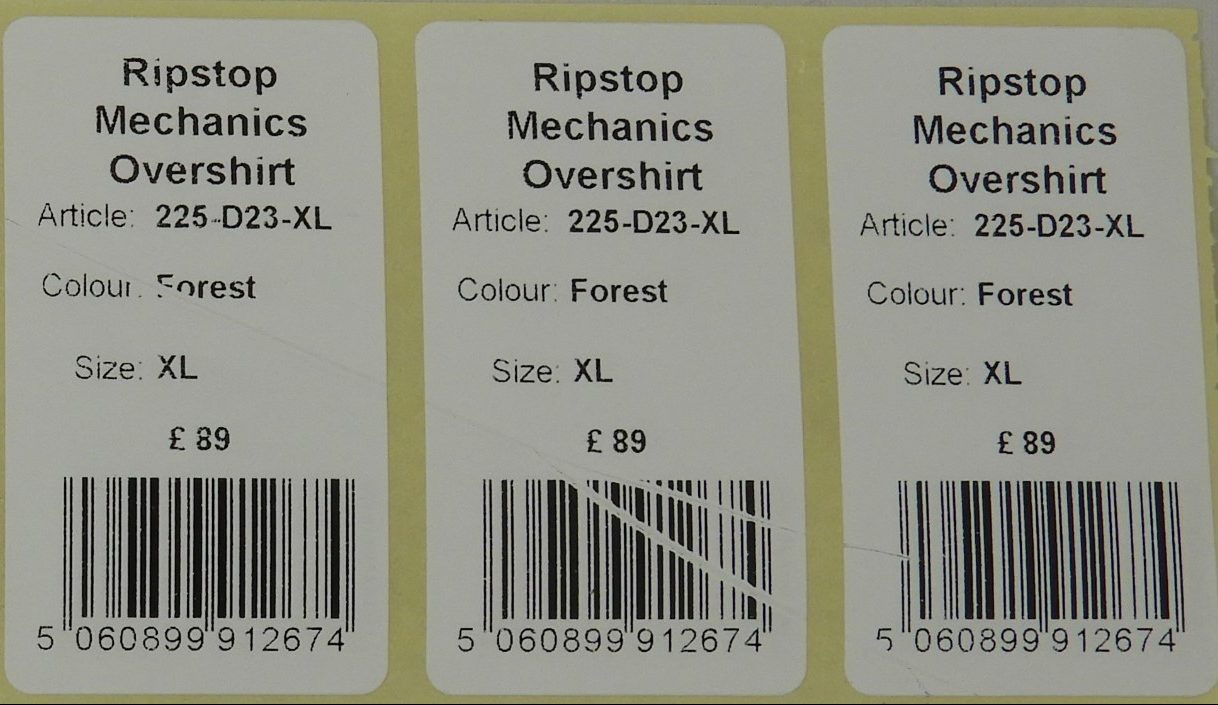
Faulty labels

In part one we saw that incorrectly printed labels are a leading cause of product recalls and lawsuits. A potential embarrassment for you, unhappy customers and something that antagonises regulators. This is part two – how to reduce labelling risks by checking proofs and label deliveries.

What you’re going to learn is how you can avoid these disasters and have confidence when you buy your labels.

3. Check Your Label Proofs to Reduce Labelling Risks

Once labels are printed they can’t be changed and you’ll need to live with the consequences.  What might be an insignificant typo can turn into a compliance nightmare.

A label proof is a label prototype.  It’s a accurate representation of what your label will look like when it’s printed.  Comes in PDF or physical format.

Usually a proof checks two things – the text that appears on the label and the colours being printed. 

Make sure the text is checked.  Sounds easy enough, but when you’ve got lots of similar but different designs, it can be a risk factor.  Where you have to meet compliance rules, a second pair of eyes is a good idea.

Colours are slightly more problematic.  In these situations, a physical ‘wet proof’ is needed.  You’ll need to wait for one to be couriered to you and it might cost money.  Use a colour swatch to ensure it matches your brand colours.

We’ll check your designs first but, at the end of the day, you are responsible for signing off your proofs.

4. Check Your Label Delivery.

We take care of your labels with our packaging – bubble wrapping, quality box materials and tracked couriers, but things can and do go wrong.

Check the labels when they arrive. Make sure they’re not water damaged or eaten by rodents. 

Some of our pharmaceutical clients even test print a sample of labels to ensure quality.

If problems are reported early we can fix them for you.  If they’re left for months, it’s more difficult to fix the problem.

Relax, Enjoy Stress-Free Label Printing

Following these best practices will reduce your labelling risks and keep you free of unwanted regulator attention,  embarrassing recalls and expensive legal cases.

Read part three to learn how to reduce risks during the printing process.

I’d love your feedback on this article.  If you’ve got a moment to comment via email I’ll be able to make it better.  info@expertlabels.co.uk

We are here to help. If you have a question, or you would like a  would like to discuss with us, please get in touch. Email sales@expertlabels.co.uk or call us on 01359 271 111, we’d love to hear from you.

Useful Links

The Health & Safety Executive

Labelling represents more of a financial risk.  Risk assessments can focus on economic losses.  HSE have some useful risk assessment tools on their website here:

https://www.hse.gov.uk/simple-health-safety/risk/steps-needed-to-manage-risk.htm

The Institute of Risk Management:

They provide resources and training to help organisations manage risk effectively.

Their website includes a large set of resources, though nothing I could find about labelling.

Website: https://www.theirm.org/

Last Updated: 27 Jul 2023

Reduce The Risk of Labelling Mistakes

Faulty Printed Labels

I don’t need to tell you that the labels on your products are essential.  What you might not realise is that incorrectly printed labels are a leading cause of product recalls and lawsuits. These Labels can lead to embarrassment for you, unhappy customers and unforgiving regulators. It is critical to reduce labelling risks.

Similarly, labels that don’t do their job and fall off or become unreadable can lead to very expensive product recalls, in healthcare – to some potentially serious health consequences and potentially catastrophic legal cases. 

If you’re responsible for labelling, these disasters can call into question your professional competence.  

What you’re going to learn is how you can avoid these disasters and have confidence when you buy your labels.

Find a Labelling Specialist to Reduce Your Labelling Risks

Fortunately, we’ve been helping customers like you reduce labelling risks for thirty years and we’ve encountered quite a few difficult situations.  Here’s how you can have peace of mind and avoid these rare but damaging consequences.

Follow our ‘Perfect Label Process’ and you won’t need to be concerned about getting your labels wrong.

1. Get Expert Help Specifying Your Labels

Talk us through what your labels need to do. 

We have a comprehensive checklist of potential ‘gotchas’ that have caught people out in the past. 

Little things you might not think about, but can lead, at the very least, to an expensive reprint. 

Examples such as peel and reveal labels popping open, labels turning black in the sun or adhesive freezing so labels fall off your products. 

Cutting corners at this stage can lead to costs in the long run.  A consultation need not take more than ten minutes but you will learn the potential pitfalls. 

2. Test Your Labels In The Environment They’ll Be Used.

High temperature label on Alumina ceramic material

Please test your labels before you buy them.  Ensure they remain stuck and remain readable.

Where we can, we’ll send you over some different samples to try.  We’re always keen to provide samples for testing.

Are you printing text onto your labels?  Do you need thermal ribbons for testing too?  We can provide labels and ribbons that are compatible with one another.

I’d love your feedback on this article.  If you’ve got a moment to comment via email I’ll be able to make it better.  info@expertlabels.co.uk

We are here to help. If you have a question, or you would like a  would like to discuss with us, please get in touch. Email sales@expertlabels.co.uk or call us on 01359 271 111, we’d love to hear from you.

Useful Links

The Institute of Risk Management:

They provide resources and training to help organisations manage risk effectively.

Their website includes a large set of resources, though nothing I could find about labelling.

Website: https://www.theirm.org/

Last Updated: 24 Jul 2023

Strategies for Optimising Your Labelling System: Stage One.

Optimised labelling is your destination
Destination: Organised Labels

As the head of operations, labels are a small, but critical part of your operation.  If labels are causing you a headache in – let me help guide you through optimising your labelling – build a fast and efficient labelling system that you can be proud of.  Imagine a labelling system that’s efficient and accurate. A system that takes data from your ERP system and produces labels with barely any human input. Labelling that’s efficient and easy.

Let’s look at how we can improve your label printing process.

Assess Your Current Labelling System.

The first step in optimising your label workflow is assessing and evaluating your existing labelling system. 

  • Do you have any obvious improvements you can make? 
  • Where are you encountering errors and problems? 
  • What parts of your system are slow and tedious? 
  • Are there points at which data needs to be entered?
  • Which areas could potentially stop your operations? 

Getting a picture of the hardware and systems you use will also help set the scene.  What information feeds into your labels and where is that information coming from.  Assessing your labelling involves studying work and data flows. The study will involve talking to your team and mapping your labelling system.

We’ve got a whole set of questions that you can download here.  Answer what you can and send it back to us here for advice.

Streamlining Label Creation and Design.

  • Do your labels have to meet all of the needs of the stakeholders needs in your organisation?
  • Is marketing happy with each consumer facing label design?
  • Do your labels meet all of the regulatory requirements?
  • Could you use your labels to build engagement with customers?
  • Who designs labels in your organisation? Are there multiple people?  
  • Are there label design guidelines to help designers? 
  • Are your labels clear and consistent across the range of designs? 
  • Do you have software that maintains the central library of label designs?

Next Steps to Creating Optimised Labelling

Labelling operations, even in a small organisation with a handful of printers, can become complex.  When labels, ribbons, hardware, maintenance, software, data management and training are considered, the complexity soars.  

The more complex a process is, the greater scope there is for inefficiencies.

Pick up the phone or send an email and find out how we can help you build a worldclass labelling system you can be proud of.

Do you like what I’ve written here?  I’d love your feedback so I can make it better for new readers.

We are here to help. If you have a question, or you would like a  would like to discuss with us, please get in touch. Email sales@expertlabels.co.uk or call us on 01359 271 111, we’d love to hear from you.

Useful Links

  1. GS1: An international non-profit organisation that develops and maintains global standards for product identification, including barcoding and labelling.

   – Website: https://www.gs1.org/


Last Updated: 10 Jul 2023

How Label Design Boosts Your Brand

As the head of marketing, it’s your responsibility to ensure that your brand is well-known, well-regarded, and properly represented in all marketing communications – including packaging.  Label design is the key to perfect packaging.

Packaging and labels are one of the final touch points for consumers on their journey to purchase. Quite often product packaging and labels are the only weapon at your disposal – posters and websites don’t appear on the supermarket aisle.

How to Make Your Packaging Stand Out and Win the Sale

First – does your product or brand occupy space in the customers mind?  If they do then much of the battle is won.  Packaging doesn’t need to tell a story – it just needs to be identifiable and accessible.  

If your marketing budget doesn’t reach the consumer before the supermarket then responsibility for winning the sale lies with your packaging and labels.

So let’s look at some tactics your labels can use to leave the supermarket in your customers hand.

Eye-Catching Label Design - is Critical

This is the job of the packaging design team.  We don’t design labels for customers – we specialise in sourcing perfect labels or your money back – but we do work with some pretty talented designers.  Contact us and we’d be pleased to introduce you to label design experts.

As you’d probably expect, we see a lot of labels come through our hands.  Anyone can tell in an instant those labels which have been designed by a professional.  If your product has moved out of the hobby phase then please invest money on professional design.  Professional label design will yield one of the best returns on investment you’re likely to encounter.

Choose a Designer Who Knows the Tricks of the Label Trade

Some of the tools your designers can use are foiling and spot varnishes.  These label features make your products literally shiny objects, just begging to be picked up. 

Whilst adding shine to your products does increase the costs of your labels, it instantly adds a 20% premium to the sale price of the product. 

After all, your eyes tell you more about the perceived quality (and price) of a product, way before you taste or smell it.

Do you like what I’ve written here?  I’d love your feedback so I can make it better for new readers.

Label Branding Checklist

  • Have I engaged a designer to work on my labels?
  • Have I put our designers in touch with Expert Labels so they’re able to take advantage of the whole range of label features?

We are here to help. If you have a question, or you would like a  would like to discuss with us, please get in touch. Email sales@expertlabels.co.uk or call us on 01359 271 111, we’d love to hear from you.

Useful Links

See our ‘Premium Labels‘ article

CEO Today Magazine Article: Why Product Packaging Is Essential To Your Branding Strategy

Last Updated: 20 Jun 2023

Tracking your assets

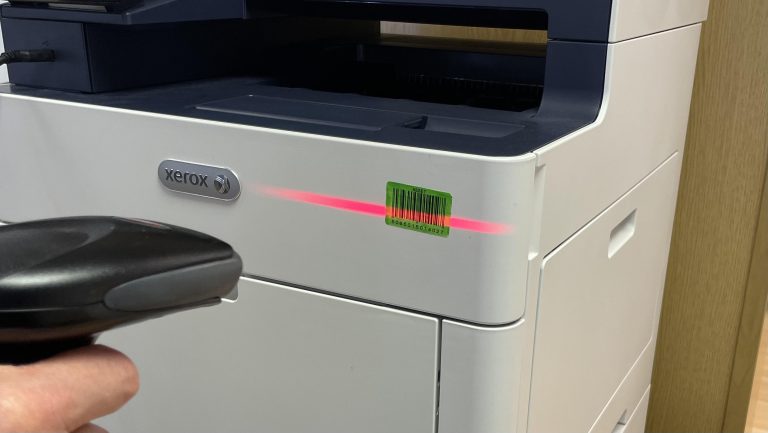
Scanning asset labels

Tracking your organisations assets is not something many senior finance managers look forward to.  Asset tracking is a side project that typically gets forgotten about and is seldom at the forefront of management’s minds, but for a relatively modest investment, you can unlock the full potential of your organisations assets, eliminate unnecessary spending and really sweat your assets.  

What you don’t have a handle on you can’t manage, and other than the people in your organisation, what’s more important than the assets at your disposal.

What I’ve written here comes from years of experience implementing asset management systems using the Wasp Mobile Asset system, mainly in large schools and public institutions, but the experience is equally valuable in any organisation that has thousands of assets that need to be managed.  

Wasp isn’t the only asset management software out there – but it is built on decades of experience mobile data collection.

Imagine… 

  • Having a list of assets effortlessly maintained.   
  • A report of what assets have been bought – and who they are assigned to.  
  • Hold on, this is the sixth tablet Bob has bought this year – what’s going on?  
  • Why are we buying another CAD printer when we already have three of them.  
  • The ‘calibrator’ was used 77% of the time this month – probably time to look at buying a second one.  
  • Van 1 and 7 are due for their annual service this month.  
  • The water boiler in the canteen is broken – who do we need to contact to get it looked at… 
  • The van was only used three times last month and the depreciation is currently at £3,000 this year – do we really need to own a van, could we just rent one when we need it?  Who’s responsible for the van – it’s Bob in sector 4A – I’ll ask him about it.  
  • No, you can’t buy more chairs – we already have 221 of them.  Go find them… 
  • The Ops director puts in a capex request for a particular machine – but it was only used for six days last month.


Setting up your Asset Management System Project

Assign project responsibility.

Define what success looks like. Here’s ours:

  • “A comprehensive shared digital asset register including assets that are of capitalisation value or that are difficult to manage (such as computers which might not be valuable but need management).
  • Relevant data in the database – such as value, purchase date, supplier (if new item with a warranty), service requirements, service history.
  • Assign asset management responsibilities to an Asset Manager.
  • Record of asset utilisation.
  • People trained to enter the data into the asset management system.
  • Data automatically synced to and from the main financial system.
  • Accurate asset loan records created.
  • Regular asset audits are undertaken quarterly and a review of assets undertaken.”

Perfection is the enemy of progress. You can build the database as you go and add functionality. You can choose to identify the most valuable or most important assets first and when you have that process bedded in, go back and record the rest. You’re aiming for 80% of the benefit from 20% of the effort.

Maintaining your digital asset system

Assets in – You already have a purchase order and capital purchase system.  The bulk of that information from those records need to be copied across to your chosen asset database.  Ask us how we can help with that – using Zapier it’s possible to link certain financial systems to a range of asset management applications.  

All new assets need to be labelled and added to the asset database.  That means a process where someone physically checks the asset in and applies an appropriate label or tag.  They need to record where the asset is and who in your organisation is responsible for it.  If this works for your organisation, once a month run an asset purchase report and go on an asset hunt with labels in hand.  

Assets out – This is the most difficult part of the asset management process.  You have a clear asset purchase authorisation process, but likely nothing so strict to cover disposals.  The person responsible for the asset needs to be made aware of their assets being disposed of.  In many cases they won’t.  How do you manage this?  The answer is frequent asset audits.

Loans and returns.  To run an efficient loan and return system, you need a secure store and trustworthy people who record assets in and out.  Practically, you could offer a self record system and undertake periodic audits to ensure the assets are being recorded accurately.  An inexpensive code entry on the door and camera can confirm who is and isn’t recording the loan.  

Do you like what I’ve written here?  I’d love your feedback so I can make it better for new readers.

Undertaking Audits

Auditing assets

This is where barcodes turns a real headache, something you put off, into a well oiled machine.  With barcodes on each asset, the same colour and located in broadly the same place, with the right software, your audit looks like this: 

  1. Scan the room ID barcode.  
  2. List of assets recorded in the room appears on your handheld terminal.  
  3. Go round and scan each asset barcode. 

Assets are checked off your list as you scan them.  Assets that shouldn’t be in the room are reported when they’re scanned and the asset manager can move them from their old location to the new one. 

Eventually you have a handful of items that should be there but can’t be found.  When you know what you’re looking for it’s easier to find them.  Can’t find them?  Carry on with the audit and hope they reappear in different locations.

Dealing with lost or stolen assets

When your assets don’t appear anywhere in your organisation – they’ve either been disposed of without following procedure, they’ve been destroyed or they’ve been stolen.  Review the list of missing items with the person responsible for them. 

After a few reviews, the responsible person will ensure assets are properly disposed of or keep a closer eye on their assets.  If you need to make insurance claims, you have all the information you need in front of you to make a claim in minutes.

For the first time ever, you have a comprehensive list of what’s missing and you can make informed decisions.  

As the head of finance, you need these reports without the time and hassle getting the data.  Following the advice in this article, you can have this.

Choosing the right asset tracking system

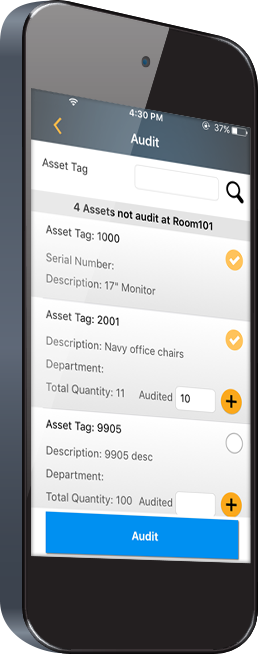
Asset tracking device

Choosing the right asset management software makes all the difference.  You’re looking for a system that:

  • Has fields that you can customise for your organisation and purposes 
  • Intuitive and simple so everyone, even temps or contractors can use it – imagine handing us your site plan and having us work through your locations and check your assets.  Leave us to do your audit. 
  • Shared – so your ops manager can see what assets she has at her disposal, or managers can see what assets they are responsible for.
  • Permissions – so the right people can view, but not edit records.
  • Audit trail – so you can see who made what changes
  • Mobile terminals – you need to be able to manage assets at the point of recording.
  • Difference depreciation methods and formulas
  • Cloud based and integrated with your finance system

The strength of your electronic asset register lies in the audit.  If the fixed asset audit isn’t done because it’s expensive, difficult or time-consuming – your asset register, and all the decisions that go with it are flawed.

Expert Labels can help you with your asset tracking

Use us to come in and do your asset audit for you.  We know how the software works and because it’s been properly set up, outside contractors like us can do the work without disrupting your department’s work.

Asset Tracking Checklist

  • Who is responsible for tracking assets?
  • What does success look like – have I defined it?
  • Have I found a digital asset tracking system that meets my needs?
  • Have I got a defined process for booking in assets?
  • Have I got a disposal system for old assets?
  • Have I got somewhere secure to store assets?
  • Have I trained people to check loan assets in and out?
  • Have I scheduled asset audits and planned to review the results?
  • Have I set up useful asset reports?
  • Have I trained my operations colleagues to use the other features in my asset tracking system such as maintenance records?

We are here to help. If you have a question, or you would like a  would like to discuss with us, please get in touch. Email sales@expertlabels.co.uk or call us on 01359 271 111, we’d love to hear from you.

Useful Links

Read the ‘8 Tips for successful asset labelling‘ article

Learn about RFID labels here.

Last Updated: 12 Jun 2023