All posts by Miles

High Temperature Heat-Proof Labels and Tags

We supply labels that are tried and tested in high temperature manufacturing processes.

If you work in an industry that needs high-temperature labels, you understand the importance of having a dependable product.

Using a label material that is not designed for the demands of your environment may cause the label to turn brown, fade or become unreadable if they are exposed to excessive heat.

With our help, we can help you choose high-temperature labels and tags are ideal for high temperature applications, as they won’t melt or become distorted at high temperatures.

Our labels can withstand temperatures between 250 °C and 1250 °C, making them perfect for the food, steel, and manufacturing industries where it is critical to effectively monitor samples or batches exposed to harsh conditions.

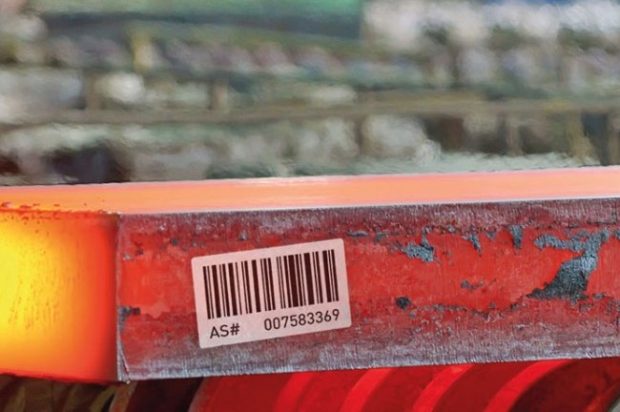
We can supply high-temperature labels and tags in different colours and finishes. For example, they can be branded with your company logo. More specific text can be overprinted with variable information, such as serial numbers, batch codes, or barcodes.

Some common uses include tracking metal products, labelling food items in ovens, products undergoing autoclave processes, ceramics, and sanitary ware. To sum it up, choosing the right high-temperature label ensures safety and compliance in your workplace, without sacrificing the legibility of crucial information.

Some of the clients we've worked with:

Not all High-Temperature Labels are the Same
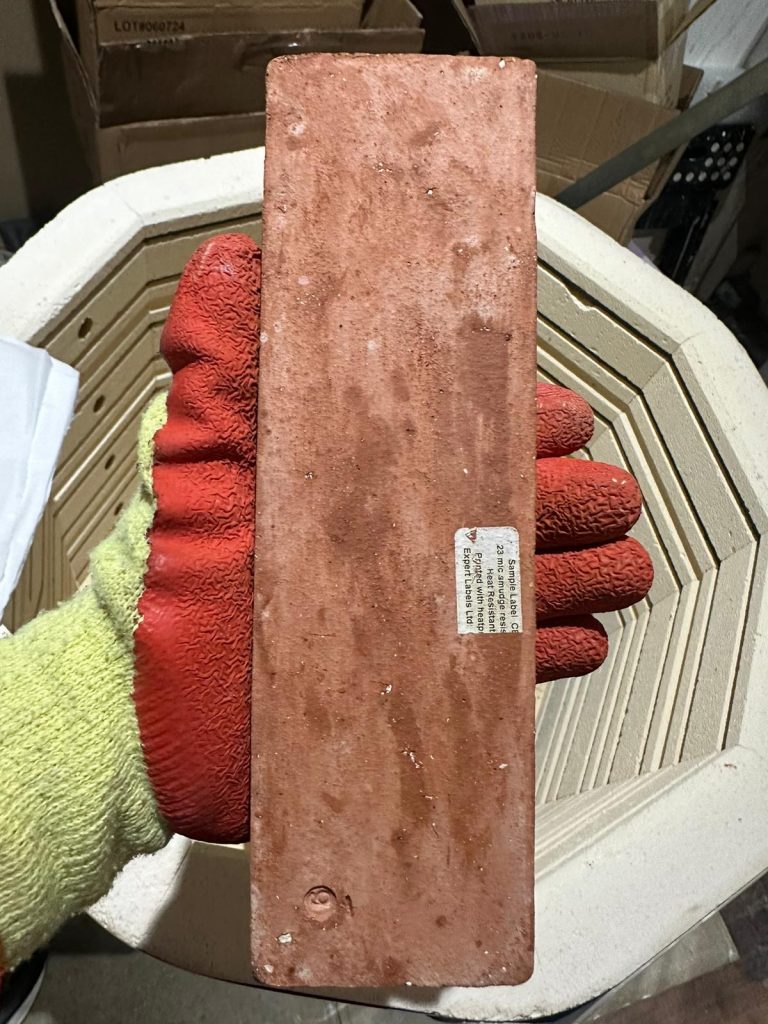
Ultra High Temp Labels on a brick after the kiln
Ultra High Temp Labels on a brick

We understand that the required temperature resistance depends on the industry, with some clients’ labels needing to withstand temperatures up to 1250 °C, while others only need to be resistant to 250 °C. Whatever you need, it’s crucial to choose the right label for the job.

Given the range of different needs, it is important to understand that each label type has its own unique set of characteristics. Some labels are designed to withstand high temperatures for extended periods of time, whereas others are only suitable for brief intervals.

Some are designed to be applied at room temperature, whilst others can be applied at 500C.

Specifying the right label means your labels will maintain key information without it melting, discolouring or smudging.  With our labels you can sure the label will remain clear and legible throughout the product’s life.

Additionally, it is crucial to keep in mind that some labels can be applied in high-temperature environments, while others can only be applied at ambient temperature. Furthermore, certain labels need specialised label applicators to stick the labels to hot surfaces.

Industrial worker applying high-temperature label using specialised tool

How much would I pay for High-Temperature Labels?

The cost of high temperature labels varies according to the label size, heat resistance and number of labels you buy. 

There are usually high minimum order quantities as the materials are expensive and need to be bought in large 250m rolls before being cut into labels.

Whilst the cost of PET labels might be less than a penny/cent depending on size and quantity, the cost of a small ultra-high temperature label is likely to be 20 pence/cents each.

If you need to print these labels using your own thermal transfer printer, you need to consider the cost of thermal ribbon too.  

Can I Print From Any Label Printer?

If you need labels for a specific thermal transfer printer – we can help.  

It needs to be a Thermal Transfer printer – that uses a thermal ribbon to print with.

We will find labels that will work in desktop and industrial models from Zebra, Honeywell, Brother, TSC and Sato.
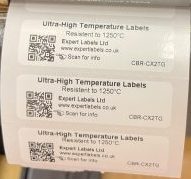
1250C Labels printed on a Thermal printer

High-Temperature Label Products

Material Type Temperature RangeDetails
Treated Polyester LabelsUp to 250 °C
  • Use standard thermal transfer printer with matched resin ribbon.

  • Applied by hand.

  • Multiple colours and wide range of sizes.

  • Suitable for different temperature ranges.
Polyimide Adhesive LabelsUp to 350 °C
  • Use standard thermal transfer printer with matched resin grade ribbon.

  • Applied by hand and suitable for exposure up to 350 °C for short periods.
Aluminium Foil Base Adhesive with Inorganic TopcoatUp to 600 °C
  • Aluminium base material with a smudge-proof coating and with a silicone adhesive.
  • Thermal transfer topcoat can be printed onto using a specialist thermal transfer ribbon.
  • Apply by hand or using specialist tool at temperatures between room temperature and 450 °C.
  • Can withstand short-term exposure up to 600 °C.
Ceramic-coated Polymer Film Adhesive LabelsUp to 1250 °C
  • Designed to be stuck to high-temp metal, ceramic and glass.

  • Thermal transfer printed with specialist high grade resin-based ribbon.

  • Resistant to chemicals, heat, shock and scratching.

  • Apply by hand at low temperatures or using a special tool at temperatures up to 1250 °C.

  • Specially made to order. There is a lead time of up to six weeks for these labels - and they come in limited sizes.

Keen to Test on your Application?

To help to ensure you make the right choice, we provide samples for testing to organisations based in the UK and Europe.

This is important, so you to see how they perform when tested on your specific application, under your specific conditions.

Thermal-transfer ribbons, also known as inks, must be carefully selected to match your labels.

Finally, if you’d like to speak with us for expert advice on the best labels, tags, and ribbons, please contact us by clicking the button below or downloading our briefing sheet. 

We are happy to sign a Non-Disclosure Agreement for your confidential projects.
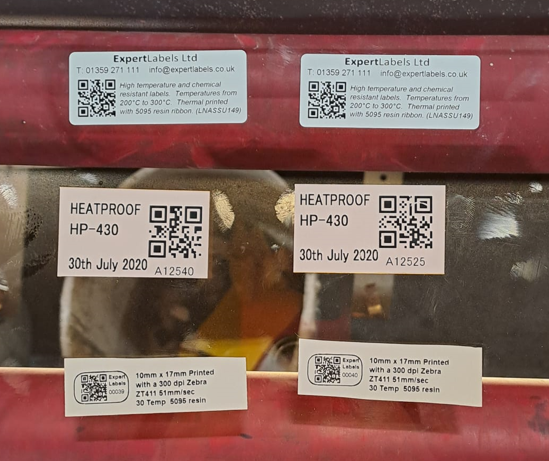
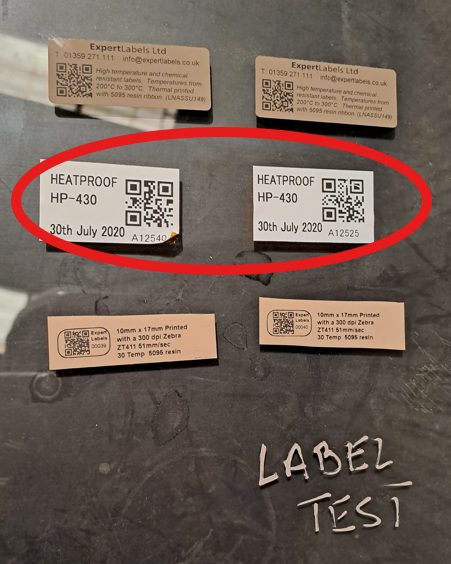
High Temp Labels Before 3 hours at over 300C
High Temp Labels After 3 hours at over 300C

As always, we are here to help. If you have a question, or specific requirement you would like to discuss with us, heat-resistant or not, please get in touch with our. Email sales@expertlabels.co.uk or call us on 01359 271 111, we’d love to hear from you.
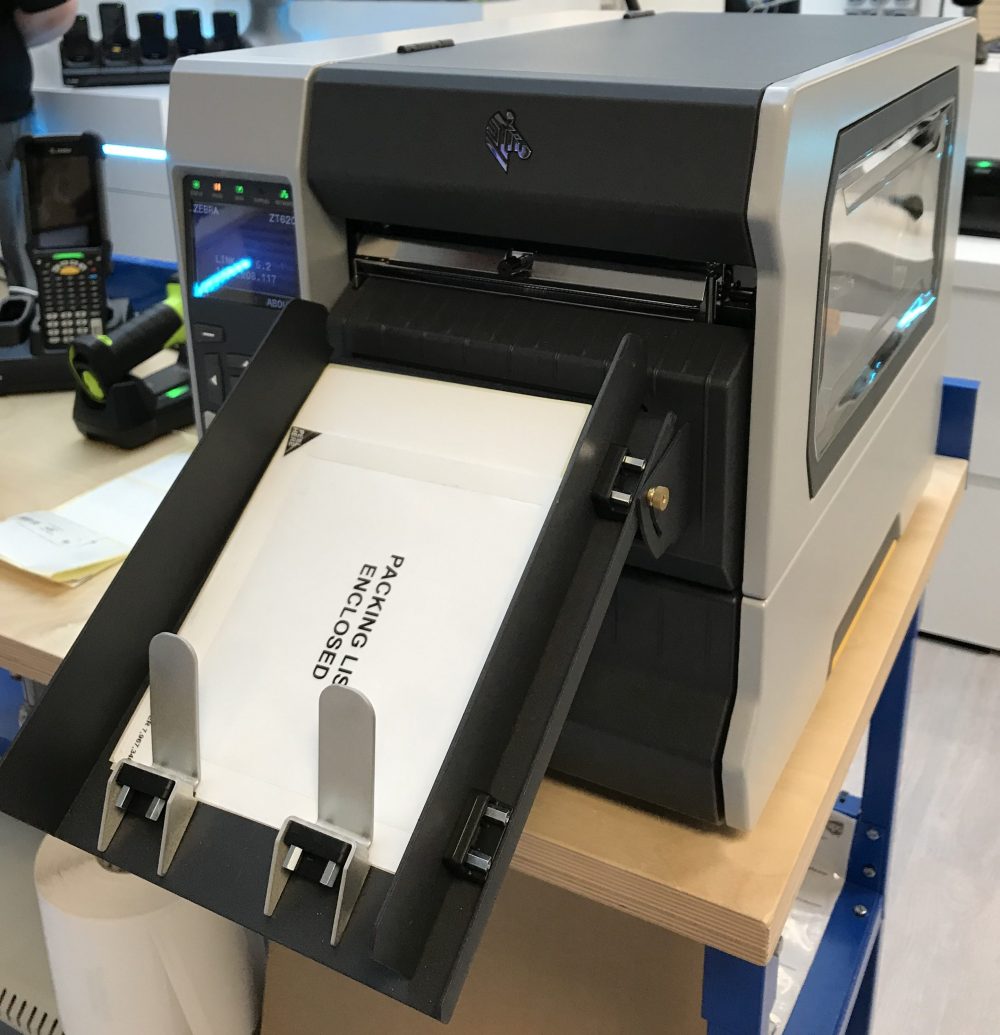
Zebra Printer ZT620

Best Industrial Thermal label printers for around £1,000

In this post you’ll be able to quickly compare the top industrial thermal label printers for around £1000.

This post includes:

  • Comparative printer prices.
  • An expert run down of the best features the printers have to offer
  • Printer shortcomings
  • Our opinion on what we think are the best printer purchases.

Weigh up the best label printer for your operation.

Read on.

Expert Labels work with all the major brands and many of the specialist brands so we’re able to find the best thermal label printers to suit your needs and your budget.   

See our recommendations at the bottom of the page. 

Updated Dec 2020.

What is an Industrial Thermal Label Printer?

An Industrial Thermal Label Printer is one that takes larger rolls of labels – typically 203mm in roll diameter – unlike the desktop models that only take 125mm rolls.  These printers also use ink ribbon rolls longer than 300m and usually print at speeds faster than 150mm (6″) per second. 

In short they are:

  • More robust, heavy duty label printers,
  • Need fewer label and ink ribbon changes and
  • Will give years of service with larger volumes of daily printing.

A note on prices – please contact us for up to date prices – as prices change weekly.  Prices have been included for comparison purposes.  Prices exclude VAT.

Download and Print The List as PDF

Download a printable pdf summarising our recommendations and analysis here.

PrinterProsConsPrice
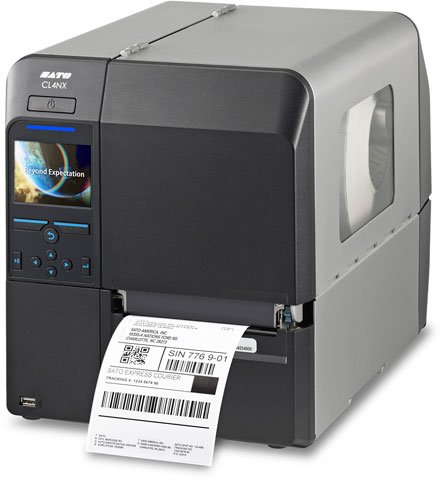
Sato CL4NX
Sato CL4NX Label Printer
Sato are a huge brand in Asia, but haven't been as successful in Europe (yet). Sato are well established, with a competent and helpful support centre in the UK.

* Lots of connections - Bluetooth, USB, Ethernet, Parallel and serial.

* Large, colour LCD display that plays videos to help you with common tasks.

*10" label roll capacity compared with 8" with almost everyone else.

* 104mm print width.

* Powerful programming language - so it can print without a computer, communicates with the cloud and integrates with scales and other devices.

* Tough cast Aluminium frame and metal case.

* Space saving bi-fold door.

* Fast printing - up to 254mm/sec.

*Comes with a free version of NiceLabel Label design software

Top quality high performance printer at a competitive price.
Not many shortcomings.

* Not as widely available as other models.
£2797More info
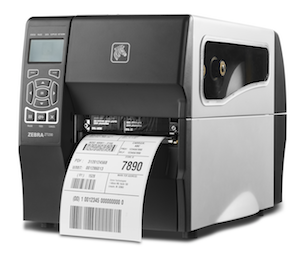
Zebra ZT230
Zebra ZT230 Metal Cased Industrial Label Printer
* Comes with Zebra’s reputation for quality and ease of use.

* Market leading brand with widespread support and availability of printers and consumables.

* Solid, durable construction.

* Bi-fold door to save space

* Thermal Transfer and Direct thermal

* Up to 450m ribbon capacity

* Excellent aftercare cover (at extra cost)

* Versatile internal printer software (ZebraLink) for programming and support

*104mm print width

* Comes with Zebra Designer label design software included for free.
* No Ethernet connection as standard.

* Average print speed – 152mm per second.
£992.29More info
TEC B-EX4T1 Industrial label Printer
Toshiba TEC B-EX4T1 Industrial Barcode Label Printer
* Super-fast - 14 inches per second. Fastest printer for less than £1000

* USB and Ethernet as standard.

* Ribbon-save - stops the ribbon feeding if there's nothing to print.

* Near edge printhead - lasts longer, copes with thicker labels and tags.

* 800m ribbon - yes - 800m! Nearly twice the length of the competition - so you can leave it unattended longer.

* Attention to detail - so it's easy to use.

* Energy efficient printer - from a company that has offset all it's carbon emissions.
* Uses a higher grade of thermal ribbon (so slightly more expensive).

* Smaller distribution base so stock and support less widespread
£1513
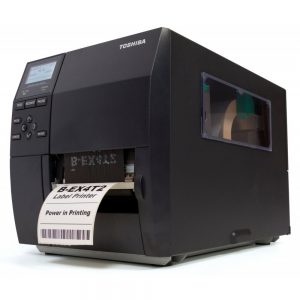
Toshiba TEC B-EX4T2
Toshiba TEC B-EX4T2 Low Cost Industrial Barcode Label Printer
* Toshiba Tec's high quality build.

* Can print up to 12 inches per second.

* Uses a 'flat' printhead like 95% of other thermal printers - so ribbons are cheaper and more widely available.

* Thermal Transfer or Direct thermal only models.

* 600m thermal ribbons mean fewer ribbon changes.

* 200mm outside diameter label roll means fewer label changes

* Network (Ethernet) is standard, as well as USB
* Fewer distributors so availability might be a problem.

* LCD display looks a little dated as it's not colour or touch sensitive.
£1247
Printronix t6000

Printronix T6000 Thermal Label Printer
* Nice large colour LCD display that provide instructions on how to use set up the printer.

* Really fast - up to 14" per second - and maintains print quality.

* Comes with ethernet (network) as standard.

* Has remote diagnostic software to warn if there are problems, enable configuration and remote management

*Widely available printer ribbons

* Option of a Barcode check camera that stops the printer if there's an error in the label
* Not widely available - limited distribution (and therefore stock)
£2539.70
Zebra ZT411
Zebra ZT411 4 inch Industrial Label Printer
Latest, improved, industrial printer from Zebra, the dominant manufacturer of thermal label printers in the world.

* Super fast - 14" (350mm) per second print speed.

* 203 to 600 dots per inch print resolution options.

* Uses 450m ink ribbons – means fewer ribbon changes.

* Comes with Ethernet and bluetooth connectivity as standard – in addition to USB and Serial.

* Large colour touch screen

* Easy to change printhead and platen roller

* Metal case and space saving bi fold door

* Built-in printer management and security software

* Excellent support options - telephone support, return to workshop and on site options

* Readily available stock (usually)
It's very difficult to find fault with this printer.

* Other brands can be found at lower prices

* Doesn't have ribbon save like some TEC printers

* If you're over-printing multipage booklet labels the thickness of these printers is limited compared to Sato printers.
£1447.53
TSC MH240 Industrial printer

TSC MH240 Series Mid-range Industrial Printer
* TSC make printers for other better known brands – so you’re getting the same quality for a better price.

* The MH-240 is fast – printing at 14 inches (350mm) per second.

* Comes with 200, 300 and 600 dots per inch print resolution options.

* Comes with Ethernet network connection as standard.

* 600m thermal ink ribbon.

* Comes with "ribbon & label running low' warning device - so you can prepare to change the ribbons and labels before it runs out

* Comes with an SD card slot

* Optional large colour touch screen display

* Metal case and frame with a bi-fold door for use in small spaces

* Comes with a Two year warranty
* Limited distribution network.

* Doesn't seem to have the remote management and security software that other brands have.

* Doesn't come with label design software but can be used with BarTender's free edition.

* 600m thermal ribbon lengths are rare and might need to be made up specially, though you can use more commonly available 450m rolls
£1695
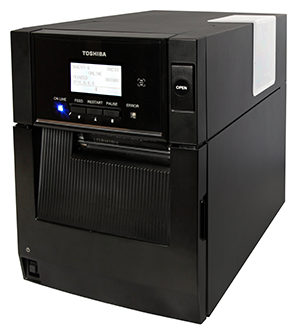
TEC BA410 printer
Toshiba TEC BA400
TEC have been making printers for decades and the BA400 is the next generation of a proven design, but launched late 2019 with updates.

* Metal case

* Unique design with a top that hinges up so labels can drop straight in. Useful if you don't have space at the sides of your printer.

* Bluetooth and Ethernet as standard

* 200mm per second print speed - a little faster than the other entry level industrial printers.

* Near Field Communication - for ease of printing from mobile devices.

*Optional 5G wifi

* Comes with BarTender Ultralite label design software - BarTender limited to TEC printers.
* Stock availability not as good as other brands.

* No colour touch screen as with some of the industrial printers.
£1289

Best Industrial Thermal Label Printers – Our Recommendations

For value for money and price performance the Sato CL4NX is hard to beat.  Take a look in detail at our write up on the printer here.  The version we reviewed a few years ago has only got better.  It’s clean design, attention to detail and powerful software means it’s a tough printer to beat. 

The Printronix T6000 is an excellent label printer.  It’s super fast, produces excellent print quality and comes with powerful remote management and configuration software.  That software can email you if your printer needs attention.  The Printtronix is one of a few printers available that can be fitted (at extra cost) with a camera that monitors the quality of each label printed.  If barcode readability is critical to your business then this is a must – the moment a label stops scanning – the printer will pause to allow you to fix the problem.

No list would be complete without the market leader.  Zebra printers are widely available, well supported and cover almost every possible application.  Which model you choose depends on how many labels you print and what interfaces you need. 

Get Information

Useful Links

Read our review of the best label printers for around £300 here.

Updated 3 Aug 2020.

Thermal Ribbon Cartridge Printer

Thermal Transfer Cartridge Printers.

I’ve not been keen on the idea of thermal transfer cartridge printers.  Cartridge printers use a roll of thermal ink ribbon in the form of a plastic cartridge. If you want to change a thermal ribbon, simply pull out the used ribbon cartridge and put in a new one.  No threading thermal transfer ribbons.  No need to clip cores into the printer.

I’ve not been keen because I’ve always felt uncomfortable being tied in to a specific supplier or manufacturer. I’ve been concerned we couldn’t get hold of a full range of ribbon materials – including different colours.  I’ve felt the benefits didn’t really amount to much – but I’ve changed my mind.

What’s so good about a thermal transfer cartridge printer?

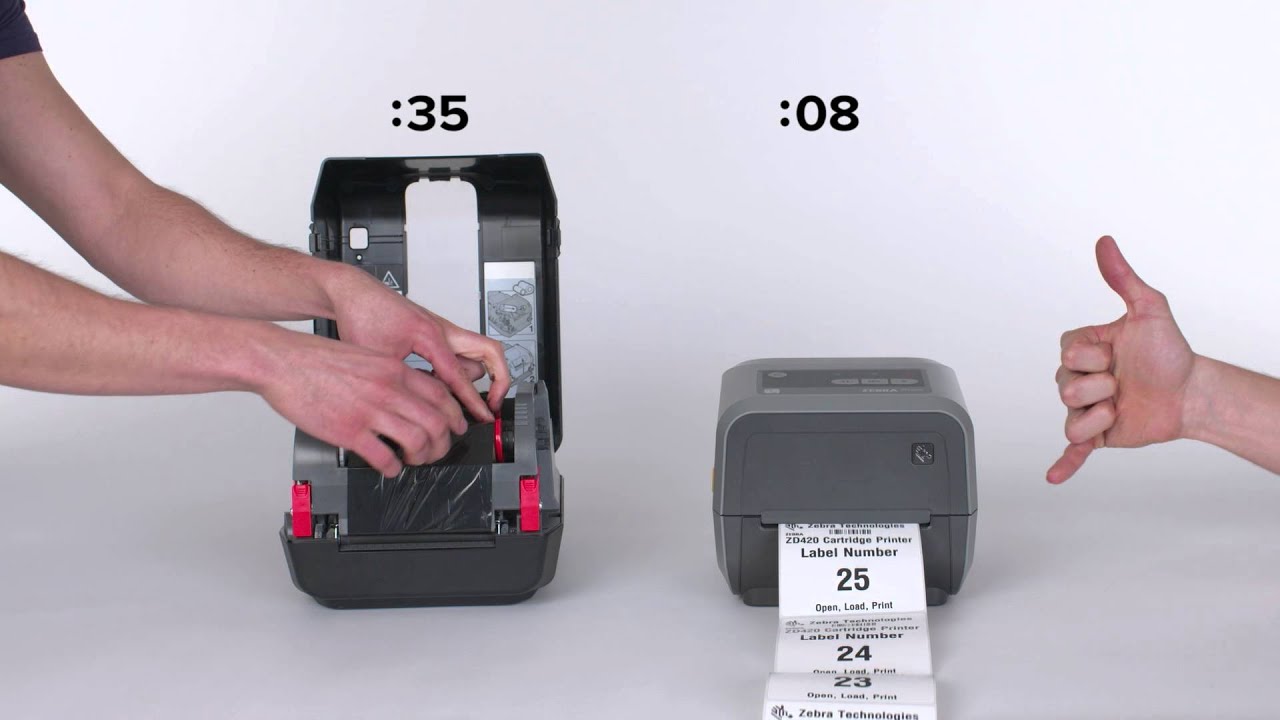
Simply: it’s so quick and easy to use.  Anyone can change a ribbon in a fraction of the time it usually takes.  Take a look at this video an you’ll see just how easy it is to use.

Zebra’s ZD420 Thermal transfer cartridge printer

The only cartridge printer available today is Zebra’s ZD420.  

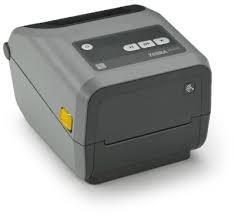
Zebra ZD420
The Zebra ZD420

The cartridge model is one of Zebra’s ZD420 family of printers – the others being a healthcare model, a standard roll fed model and a direct thermal model. 

It quickly established itself as a popular and easy to use desktop label printer since it’s launch in 2016. 

Where you’d use a cartridge printer

We’ve been working with a company that has untrained volunteers  printing labels on demand for customers.

Imagine you have a competition. You’re labelling clients’ bags before transporting them to the end point. You have a couple of volunteer staff looking after clients, entering data, putting bags in a van and looking after the printers.

There’s a small queue of customers and suddenly the ribbon runs out. Your volunteer has never changed a roll of ribbon and has barely seen a thermal printer before.  He tries to figure it out for himself. He looks at the diagram on the printer, he asks his colleague and he even asks the people waiting. Then he gives it a go.

Five minutes later the ribbon is changed – but it’s been a struggle, it takes time and it prevents staff from looking after their customers.

With a cartridge printer he’d have opened the printer, unwrapped the cartridge, pulled out the old one and slotted in the new one. All done in a matter of seconds – without the need for training. No need to look at instructions.

Ribbon Cartridge Size Options

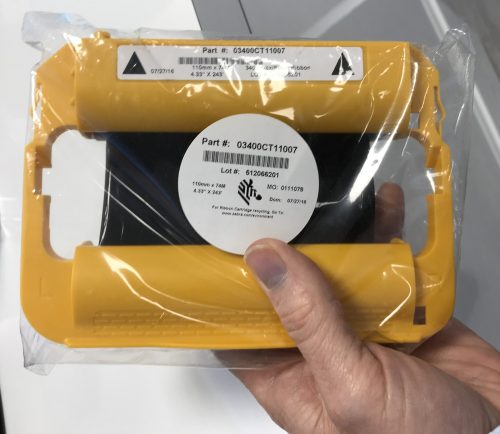
Zebra Thermal Printer Cartridge

This is where the ribbon cartridge struggles, compared with standard ribbons. There are only three different cartridges available – Wax, Wax resin and Resin. All ribbons are 110mm wide and 74m long.

All thermal cartridge ribbons are black.

In the past twenty years I imagine we have only sold a few dozen boxes of coloured ribbons, so the limited colour range is unlikely to affect many of you.

Another big downside – the cost of a ribbon cartridge is around twice as much as a standard Zebra ribbon, at around £5 per cartridge. If you are printing a 100mm x 100mm paper label, that still only works out at 0.7p per label for ink.

Summing up – Thermal Transfer Cartridge Printers

  • Extremely convenient and fast – minimises downtime and customer inconvenience
  • No training needed – anyone can quickly use the printer
  • Limited range of ribbons – not a problem if that suits the label or tag you’re printing
  • Expensive in comparison to standard ribbons.

Further Help

Want to know more about cartridge printers? Want to buy a cartridge printer or cartridges? Contact us here or complete our form below.

Useful links

Learn more about Zebra’s ZD420 printer on the Zebra website.

Updated 11 Jan 2020

Biodegradable Labels

Guide to Biodegradable Labels

With plastic doing so much harm to our environment – more and more of us are looking at biodegradable packaging to minimise damage.  This guide to biodegradable labels will help you in your small but significant contribution to the war on plastic.

How can you, as someone who buys labels for your product packaging, meet your customers demands and use biodegradable labels to reduce environmental damage?

Biodegradable labels is a complicated subject and to fully understand it, you’ll need to read all of this guide.  Even though these labels will biodegrade there are practical things to consider from the point of view of the packaging and the local authority that handles your customers’ household waste.

We'll be Covering

What are biodegradable labels and tags?

What is the difference between biodegradable and compostable labels and tags

Biodegradable paper labels

Biodegradable plastic labels and tags

Oxo-biodegradable plastic labels and tags

How to know if you really have biodegradable labels?

Why recyclers don’t like biodegradable labels

Conclusion – recycleable or biodegradable?

What are Biodegradable Labels and Tags?

Biodegradable labels are labels that will be broken down by nature – fungus, bacteria, natural chemicals and plants.

Technically everything is broken down by nature – even plastic and metal – the real question is:

  • how long it takes,
  • what conditions it breaks down under and
  • what it breaks down into (or what gasses it emits) during the process.

There are no standards we are aware of for biodegradable labels – though there are for compostable labels.  We’ll look at compostable labels below.

Biodegradable Paper Labels

Biodegradable paper labels are the most straight-forward labels. 

Most papers are biodegradable however the adhesive is the sticking point (pun untended). 

For a paper label to be biodegradable, it needs a certified biodegradable adhesive.  Because these adhesives aren’t made in the volume that standard adhesives are, the cost of biodegradable paper labels is much higher than standard paper labels.

Tags are often made from card and because they don’t have adhesive they are biodegradable, providing they are not laminated with plastic or printed with a lot of non-biodegradable varnish or ink.

We haven’t yet found a biodegradable paper tag that is suitable for long periods outdoors (obviously). 

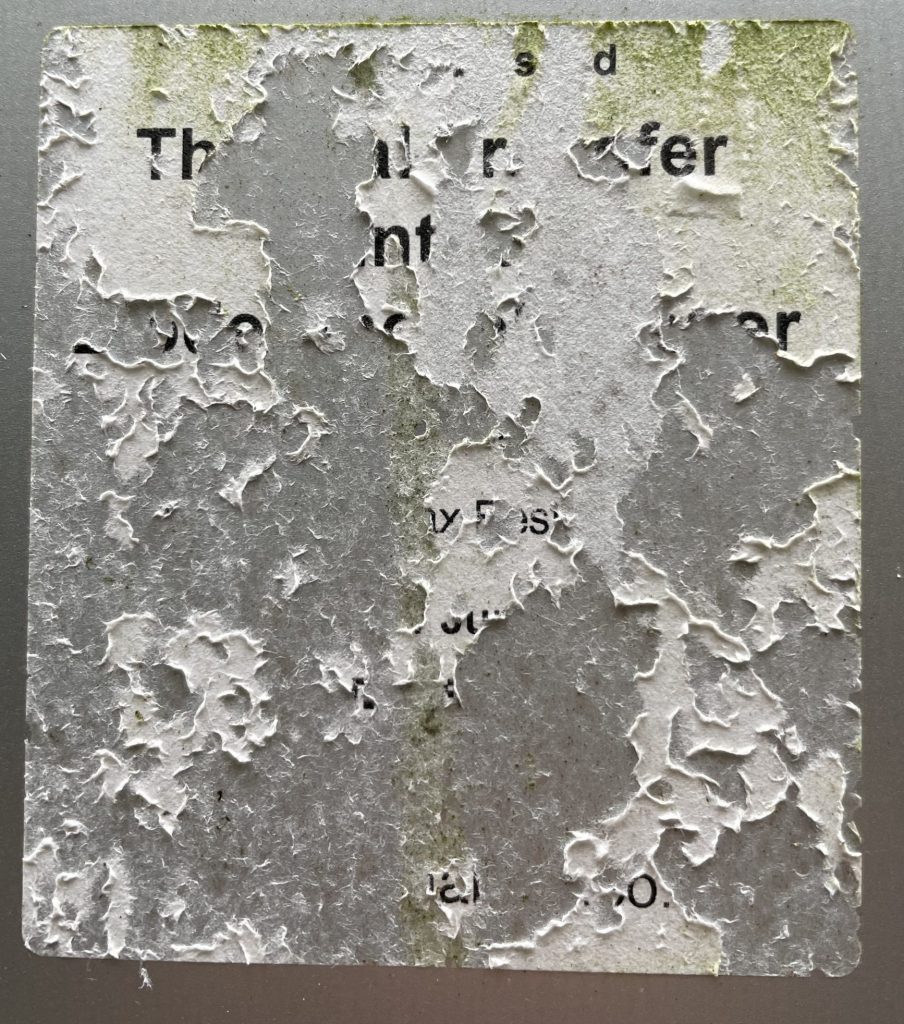
18 month old biodegradable paper label
Labels so tasty the snails ate it
Biodegradable Synthetic
Clear Biodegradable Label After One Year.

If you’re interested in using biodegradable labels on your packaging, we can provide a quote or help with sample labels.  Read this page to help you set your label budget.  How to Set my Label Budget.  

Click the button below for a quote

Get Quote

Click this link to get a sample of biodegradable label.

The Compostable Standard

Despite the importance of biodegradable labels in the news, the industry has been slow to catch up.

Sourcing biodegradable label material isn’t easy.  We are able only to supply labels made from four types of biodegradable label material at the moment.

  • Matt biodegradable paper
  • Gloss biodegradable paper
  • Gloss biodegradable white film and
  • Clear biodegradable film

Composting is the breakdown of materials into the soil.  The good thing about composting is that there is a standard to measure against. 

Other forms of Biodegradablility (such as into the air or water) don’t have such a standard. 

The most widely accepted standard for composting is the European compostable packaging standard (EN13432).

Industrial composting

Labels that meet the EN13432 standard break down into water, CO2 and new cell biomass.

To meet the standard they have to do so within six months. 

Compostable logo displayed on Biodegradable labels

Something to consider, however, are the conditions under which the composting takes place.

Importantly, the standard requires the label not to generate any harmful by-products.  Particular attention is paid to potentially toxic elements.

A key part of the European standard is that after 12 weeks, 90% of the material is in pieces smaller than 2mm.

If the material passes all the criteria then it can display the Compostable logo.

EN13432 applies to industrial composting as opposed to home composting.

The difference between home composting and Industrial or commercial composting are the conditions the process is done under.

For example, industrial composting is tested at 58C, home composting is typically around 30C.

There are no international standards for home composting.

The European EN13432 standard includes the glue, label and ink.  

Contamination of Waste by Biodegradable Plastic Labels is a Problem

Despite their eco-friendly credentials, biodegradable plastic labels are a problem for home and municipal waste disposal. 

Biodegradable plastic can’t be recycled with standard plastics.  If they are included with plastic they will contaminate it.  As they are not paper they will contaminate paper as well. 

They can’t be disposed of with food waste because they take longer to biodegrade (unless they are put through an industrial composting process).

In many local authorities, biodegradable plastic labels go to landfill, and whilst they will breakdown more rapidly than standard plastics, and won’t leave any toxic residues, they may contribute to powerful greenhouse gasses such as methane.

Identifying Biodegradable Plastic Labels

Even with the biggest ‘Compostable’ logos, it’s practically impossible for human or machine sorters to recognise biodegradable labels from normal plastic labels. 

Generally speaking standard plastic contamination in garden or food waste is a big problem in composting.  Local authorities are particularly sensitive to plastic contamination.  If they see any plastic – biodegradable plastic labels or standard plastic labels in organic waste, it will be rejected and sent to landfill or burned.

Oxo-Biodegradable Plastics

Some biodegradable labels have a chemical added to them that needs to be exposed to oxygen or water to trigger the decomposition process.  These oxo-biodegradables create micro-plastics that are considered harmful and therefore not a good alternative to standard plastics.  

Oxo-plastic labels can’t gain compostable EN13432 certification.

None of our biodegradable range of labels are made with Oxo-biodegradable plastics.

Only put Biodegradable Labels on Biodegradable Packaging

It’s no good putting biodegradable stickers onto product that isn’t biodegradable.  A biodegradable label on a glass bottle is a waste of money.

Not only does the packaging need to be biodegradable – it needs to look biodegradable.  If it doesn’t look biodegradable waste handlers will send it to landfill where it will break down slowly.

Currently, the only combination of stickers and packaging that look biodegradable are paper stickers on cardboard packaging.

Conclusion - Use Paper or Recycleable Plastic

It’s impossible to say what conditions labels will be disposed (or discarded) under. 

Biodegradable plastics might not degrade as completely and as quickly as we want them to.   If they go through the waste disposal system (as hopefully the bulk of them will) they might cause more problems than they solve.

My recommendation is to use paper labels, without any plastic coating and with an adhesive that will break down without leaving any harmful by-products.  What we describe as a biodegradable paper label.

If you are using plastic packaging, I hope (and expect) most of your packaging will be disposed of responsibly by your consumers. 

Because most of your labels will be disposed of into the recycling system, use a label material that can be recycled and use a recyclable label NOT a biodegradable plastic sticker.

 Carelessly discardedDisposed of properly
Plastic packagingBiodegradable paper labelsRecycled plastic labels
Paper or card packagingBiodegradable paper labelsBiodegradable paper labels


We Want to Help You Improve Our Environment.

We are as keen to improve our environment as you are and want to help.  This guide to biodegradable labels is only a start. 

Please pick up the phone and call 01359 271 111 or contact us and ask us how we can help you help our environment.

Useful Links

Understanding Label Prices – a resource to help you understand what to expect with costing label projects.

The concise guide to compostable packaging and products – EN 2013432 – by the Association for Organics Recycling:

http://www.organics-recycling.org.uk/uploads/article1983/EN%2013432%20Compostable%20Products%20and%20Packaging.pdf

See our range of environmentally friendly labels here:

Biodegradable labels

Sustainable labels

Recyclable labels

Here’s a definition of biodegradation on Wikipedia:  https://en.wikipedia.org/wiki/Biodegradation


Linerless Labels

Linerless labels are labels that don’t have the familiar yellowy non stick backing paper.

Label backing material
Do Away with Label backing material

Linerless labels save weight, cost and are more environmentally friendly.  You even get more labels on a roll but…

You need a specially adapted printer and special labels.  Additionally, you need to apply the labels at the point of printing.

They are ideal for portable printers – because you don’t have to change the label rolls as often and your printer is right there with you where you need to use the labels.

They are also great for print and apply systems.

Sustainable Labels

There is a lot of talk about limiting the harm we’re doing to our environment.  Being sustainable is the ability to live without depleting our natural resources.  Modern packaging is often held up as a culprit in the damage we are doing to our environment.  This article will help you understand how sustainable labels really are.

Sustainability is both the materials the labels are made from and the process the labels are made under.

There are always two sides to many of the points raised in this article.  For example: the forests grown in order to make paper are good for capturing CO2 but, as they are usually grown in large single species plantations – this can be bad for bio-diversity.  I’m not writing this article to promote one side or the other in this debate.  Our business is focused on labels – but we all depend on the environment for our survival as a species.

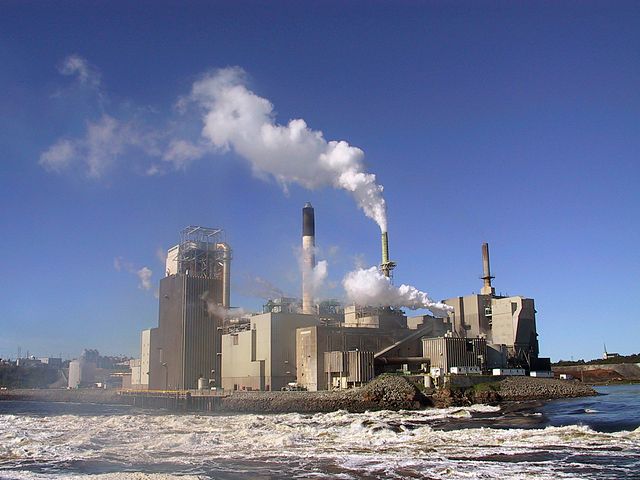
paper mill
Pollution from paper mills

Paper label manufacturing

The paper making process uses water, wood and energy and leads to water and air pollution.  Paper manufacturing accounts for up to 5% of pollution in North America.  In the last few decades paper mills have reduced their pollution significantly and I’m sure technology  and innovation will reduce the environmental impact further, however paper isn’t without it’s harmful by-products.

Water is the ultimate recycled product.  Should we worry about water use in paper making?  If it’s cleaned and returned to rivers and lakes, water consumption in paper making isn’t a problem.

Paper’s main raw material – wood – is renewable and good for CO2 capture. 

Energy use – Whilst paper product uses huge amounts of energy, most of it is sourced from bio-mass energy generation.

All the labels we supply are paper or plastic. 

All the paper we supply comes from sustainable sources (i.e trees that are farmed as opposed to tropical rainforest).  However, paper is usually made using chemicals that are harmful to the environment.  

Chlorine is used in the paper making process – to whiten the paper.  As you would probably guess, Chlorine is toxic and, as a by-product of paper production, is harmful to the environment.  Our standard paper label material uses chlorine, though the same chlorine compound is used to treat drinking water. 

Mono-culture forest trees
Mono-culture forest for paper production

Sustainable Paper Labels

Standard paper labels are made from virgin paper with chlorine bleaching. Paper is sustainable, but the paper production process has a significantly damaging effect on the environment

We are able to supply a recycled paper label that is chlorine free, with a wood free backing paper (the paper that the labels are stuck to on the roll).  Interestingly people rarely ask for recycled paper labels and the availability of the material is limited.  Contact us and ask us about recycled paper labels.

Plastic Labels

Most of the labels we supply are made from Polypropylene (PP) or Polyethylene (PE).

This type of plastic label is made from oil, but is easily recycled.  The most recent figures I found for the proportion of plastic that’s recycled was from 2008 and 21% of plastic was recycled. 

However, plastic labels are not biodegradable (unless you count hundreds of years as biodegradable), so are harmful to nature and are non-renewable. 

From a marketing point of view, plastic labels are not popular.

Sustainable BioPlastic Labels

More popular BioPlastic label materials are PP and PE labels made from corn, coconut or potato.  These starch-based plastics are sometimes compostable.  They are not widely available and relatively expensive, but we are able to supply you with them. 

The best we can obtain is 83% sugar cane derived material, 17% oil-based.  Contact us for a quote.

Clear and white plastics made from wood pulp – cellulose – if made from sustainable forestry products are an extremely eco-responsible way of making labels. 

There are cellulose based labels available, though they are water soluble, so not suitable for long term storage in wet places (i.e. not good for products destined for bathrooms). 

Not only are these labels sustainable – some are also biodegradable.  See our biodegradable range here.

Updated: 5 Oct 2024

Useful links

Wikipedia’s article on the environmental impact of paper: https://en.wikipedia.org/wiki/Environmental_impact_of_paper

British Plastics Federation (perhaps a little biased – but it quotes the recycling rate of plastic)

https://www.bpf.co.uk/sustainability/plastics_and_sustainability.aspx

Bioplastics Article at ‘Explain that stuff’:

https://www.explainthatstuff.com/bioplastics.html

Print Station: BarTender’s Label Printing Secret

BarTender Print Station

Print Station is BarTender's Label Printing Front End

Printing labels with BarTender can be a little time consuming. 

First you need to open BarTender, then you need to find the label file.  Once you’ve found the label file you need to open it.  The next step is to choose print from the menu and start the printing process.  

Printing labels is not difficult, but if you rarely use BarTender, finding the correct label and remembering the printing process might take time.

BarTender Print Station, a BarTender ‘companion app’, is BarTender’s solution to this.  Print Station is included with all BarTender editions and makes printing labels so simple, a five year old could do it.

How to Use BarTender's Print Station

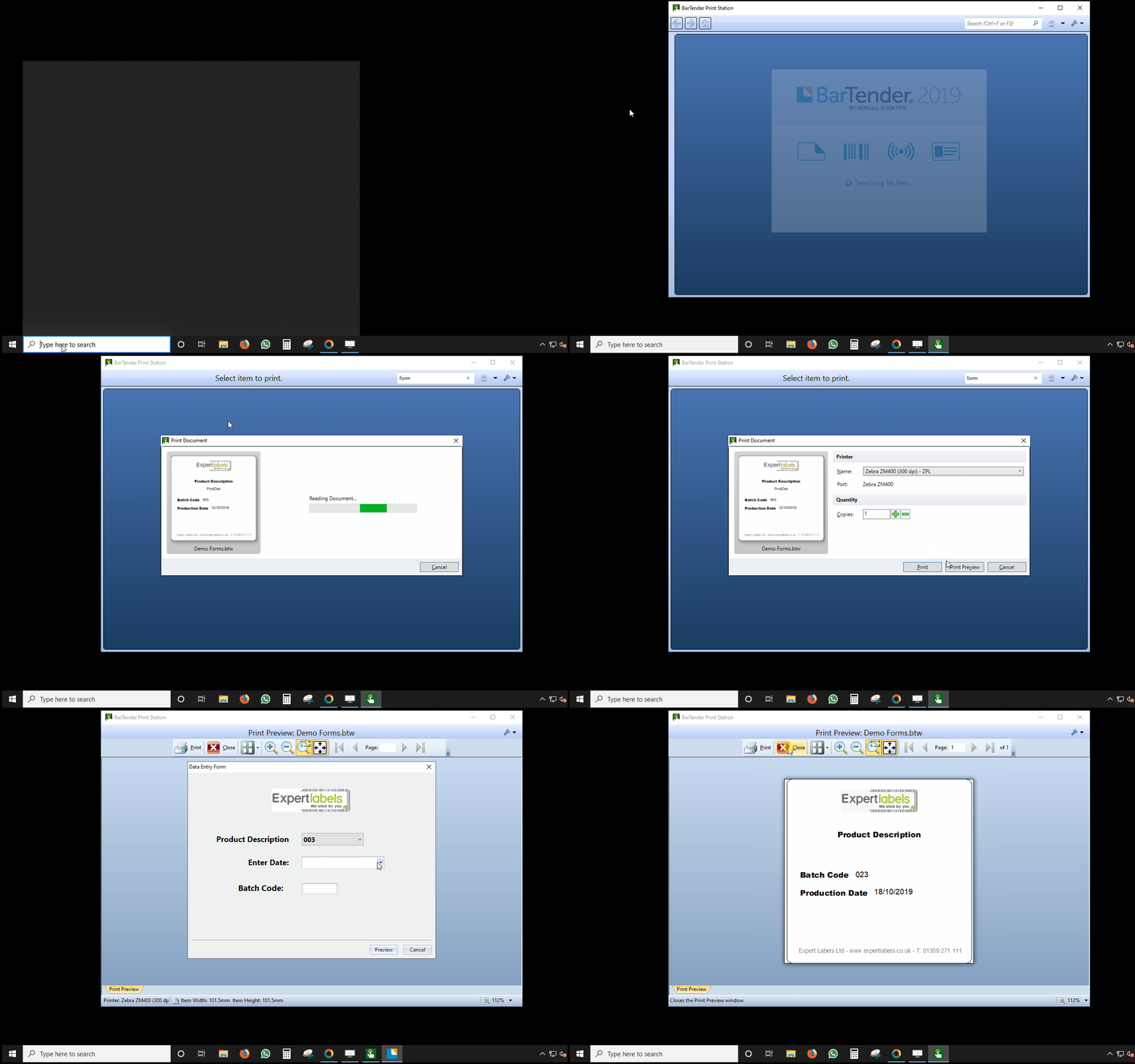
Look at the image at the top of this post if you want to see Print Station in action.

How to use Print Station:

  1. Open Print Station from your computer’s start menu.
  2. Look through the label thumbnail images until you see the label you want.
  3. Click on the label image.
  4. Choose how many copies of the label you want and press print.

Simple!

Tips & Tricks

  • Streamline your label printing process even further – set up Print Station to open straight to the folder your labels designs are kept in.
  • Where you have inexperienced BarTender users, or your label designs look complicated, by-pass BarTender designer and open Print Station when you click on a label design.  In Microsoft Windows, associate your BarTender design files (.btw)  to open Print Station instead of Bartender Designer on certain users’ computers. 

Want Help with your Print Station?

If you would like help with BarTender’s Print Station, enjoy a complimentary 30 minute remote training session to get to know Print Station.  Learning Print Station will only take five minutes – but let us show you other features to make label printing easier and faster.

Contact us by email or phone (01359 271 111) and ask for our BarTender expert.


Useful Links

Updated: 14 Oct 2019

Using forms to protect your label designs

BarTender Forms

How BarTender Forms Work

BarTender forms make label printing easy and error proof.

BarTender forms pop up at print time and prompt you for the information you need to print with. For example, you could be asked to choose a product description or code, a batch code and a production date.

Enter the data on the form and watch as your labels print the data.

No need to edit the label each time you print. Using BarTender forms you can even limit fields to specific characters, number formats or lengths – ensuring consistent labels and eliminating mistakes on your labels.

How to Use BarTender Forms

Choose from 19 different ways to enter data from drop down lists and calendars to number sliders and database choosers.

Add the different form controls to your form, then match the form controls to the fields on the label by dragging them together.  Add forms to your labels in minutes.

Want Help with your Label Forms?

If you would like help with your label forms, enjoy a complimentary 30 minute remote training session to get your forms started.

Contact us by email or phone (01359 271 111) and ask for our BarTender expert.


Useful Links

Updated: 12 Oct 2019

Datalogic’s Gryphon Cordless barcode scanner

Datalogic Gryphon 4500 family of scanner
Datalogic Gryphon 4500 Family Photograph.

We recently worked on a project and used Datalogic’s Gryphon 4500 series cordless 2D barcode scanner.  It’s a cordless scanner that can read normal 1D barcodes and 2D codes (like QR codes and datamatrix) as well.  It comes with a healthcare coating – which inhibits the growth of bacteria and cleaning the scanner with harsh chemicals doesn’t damage it.

Here are some of the things that impressed and didn’t impress us about the scanner.

Summary

What we like

  • Looks and feels like quality.
  • Scans lightning fast
  • Scans 1D & 2D barcodes
  • Displays a green good read light

What we didn’t like

  • Wasn’t easy to adjust the stand
  • Expensive

Look and feel

Datalogic Gryphon 4500

First impressions, the scanner feels good. It’s a comfortable weight – feels nice and solid without being too heavy. It’s designed in Italy and it looks good. With it being cordless, it feels tidy.

Very easy to use – with a clear aiming mark.  Useful if you’re choosing a barcode from a menu of other codes.

Datalogic GBT 4500

Bright white barcode illumination, so you can clearly see what’s being scanned.  Also better with coloured barcodes.

Gryphone Cordless scanner in stand

Automatic barcode detection and scanning. Just wave the code under the scanner and it reads it automatically.

Most of Datalogic’s range comes with a green dot good read indicator.  If you’re busy looking at the item you’re scanning then having a confirmation of sucessfully scanning your code is very helpful.  There’s also a big green indicator at the back of the scanner as well.

Datalogic Gryphon with Good read light
Gryphon - no connector chanring

The cordless Gryphon has eliminated charging contacts or sockets on the GBT4500,  the latest Datalogic cordless scanner.  No contacts to clean.  Whilst that removes a potential vulnerability on the scanner, they’ve included a hidden cable connector in the bottom of the scanner for a USB cable.


Negatives

There wasn’t much to fault about the Gryphon GBT4500 scanner. The only slight inconvenience I suffered was adjusting the charging stand. It has a locking screw and you need a screwdriver to unlock it.

It isn’t the cheapest cordless scanner on the market. Priced at around £450-£500 for the scanner and charging cradle, it’s an expensive option.

Summary

The Datalogic GBT4500 is a quality piece of equipment with a two-year guarantee and so many features I can’t begin to describe them all in this review.  Easy to use, lightning fast and very versatile, you’d be pleased when you bought it.  It’s not the cheapest, but it is quality.

If you’d like to find out more about the Gryphon 4500 cordless barcode scanner click here and ask me any questions.

– Miles Green

Here’s Datalogic’s Gryphon 4500 video, demonstrating the scanner and it’s features.

Brewery Labels

If you’re in the fast-growing brewery and craft beer industry and are ready to start manufacturing, you’ll need labels that will make your drink stand out from the rest. Whether you’ve already got a design or you need a hand with one, Expert Labels are here to help.

Using the latest digital label printing technology, we can produce as few as 1000 labels, all with different designs printed to the highest quality standards for a truly professional finish – perfect for microbreweries who are producing labels for the first time.  Let us print your labels from your own design, helping your bottles of beer, wine or cider stand out from the rest.

We can provide you with:

  • Multiple materials and colours, such as waterproof labels, Crystal Clear, Matte Clear, Gold, Silver, Blue Foil or Glossy White
  • More than 6,000 cutter choices for unique shapes
  • Barcodes for your brews, along with barcode printing if you already have your own barcodes ready
  • Thermal label printers for in-house case and keg labelling

We are here to help you every step of the way with labels for your brews. For more information, give us a call on 01359 271 111, email us at info@expertlabels.co.uk, or fill in our contact form and we will get in touch.

Other pages you might find useful

http://expertlabels.co.uk/applications/waterproof-labels/

http://expertlabels.co.uk/applications/barcode-labels/

http://expertlabels.co.uk/services/barcode-label-printing/

http://expertlabels.co.uk/contact-us/

http://expertlabels.co.uk/products/Choosing-the-Right-Barcode-Printers

https://www.gs1uk.org/get-a-barcode

Get Samples
Get Quote