All posts by Miles

Put your feet up and outsource your label printing

Let’s take a look at the economics and practicalities of printing labels in house compared with outsourcing label printing to someone like us.

What you need to print your own labels

For a start, you need a printer, labels, labelling software, ink ribbon.

Depending on the volume of labels you’re printing and the size and durability of labels will determine what printer you need.

Desktop label printer, labels, ribbon and CD
What you need to print your own labels

Likely costs – printer, labels, ribbons and software.  A small desktop printer, a box of paper labels and ribbons and basic software will cost you up to £550.

Then there are the unseen and unexpected costs –

  • Repair costs – the printer needs fixing every couple of years (unlikely as thermal printers are very reliable – but you never know).  The printhead which costs a few hundred pounds (on a larger printer) wears out over time. This needs to be factored in to the costs of printing.
  • Support costs – getting someone to set the printer up or the time you spend reading manuals, training costs – and the costs of not training (such as discovering one of the warehouse boys cut a vital part of the printer when they were using a knife to get a stuck label out of the printer),
  • Management Time – trying to hook the printer up to the network or deciding what model of printer would be best suited to a particular situation and
  • Time spent supervising the printer. Reloading labels and ribbons and keeping an eye on the printer.
  • Time spent rolling labels – time spent taking printed labels and re-reeling them back onto cardboard cores.
  • Storage and printing space – keeping boxes of labels and a large printer can use up precious space you could use for other things.
  • Label printing accessories – label rewind units, label counters and slitters spring to mind.  They make label printing more efficient but they cost money.

Pros and cons of printing in house.

Pros

  1. No delays – print them when you want them
  2. Print dates and batch codes – difficult when your labels are printed in advance
  3. Economical if you have high volumes to print.  That said – talk to us about high volume label printing – the difference in cost between in house printing and outsourced might be closer than you think and you can use the staff you have to focus inside your business and leave us to concentrate on your labels.

Cons

  1. If you print them wrong you only have yourself to blame
  2. You might need to invest in large amounts of labels – when you only print a few hundred labels at a time.
  3. It takes time to learn the software and how to operate the printer
  4. You are vulnerable to printer breakdown.  If you have your labels printed for you – make sure the printing company has more than one printer (we do).
Label Printing Centre
Three printers for printing labels is better than one

Summary

If you have a need to print unique labels to match a particular item, you need labels with a date on them or you print lots of labels – I recommend you print them in house.  Otherwise – click on the chat button in the bottom right corner of the screen or contact us and get a quote for us to print your labels for you.

Weigh the costs against the convenience of having us print your labels.

If we have suitable labels on the shelf your labels can be printed today and with you tomorrow.

Useful links

Label Printing Services

Published 15 Apr 2019

Seagull Scientific’s BarTender Launch Conference

On Monday 8th April 2019 Seagull Scientific launches the latest version of their popular and powerful BarTender label design software. On Thursday 4th April they invited a select group of partners to hear the latest news and meet the Seagull senior management. Here’s what I learned…

BarTender 2019 is more streamlined and has some minor features added.

Its user interface has been tweaked.  Everything looks pretty similar – so users of older versions will feel at home.  It’s only when you start adding text or other features that you stop and realise the capabilities are different.

BarTender price and licencing has changed – Gone is the basic edition and now there are three editions – Pro, Automation and Enterprise.  Now you pay for the software licence and an additional fee for each printer you intend to print to.  There is a free version of BarTender, but interestingly Seagull hasn’t said a word about it.

Support is improved but charged for. Now there are target response times when you contact Seagull, but you pay for maintence and support.  The first year of maintence is bundled in the software price, but you need to pay extra for subsequent years.  The good news is that maintence also means you get upgraded to the latest version of the software.  The bad news is that you won’t be able to buy additional printer licences unless you have maintenance cover.

What else did I learn?

Fingerprinting Products

Harold Boa, Seagull’s CEO, talked of ‘fingerprinting’ products – uniquely identifying each and every product with a 2D barcode.  When you scan it with an app (it seems Amazon may be working on such apps) you can see it’s a genuine product, giving you confidence in the brand.

For brand owners it means their customers can check the item hasn’t been counterfeited or sold through unauthorised channels.  Customers can check information not printed on the labelling and product recalls can be done in a much more targeted way.

Harold Boa, Seagull Scientific's CEO
Harold Boa, Seagull Scientific’s CEO, at the BarTender 2019 Partner day.

Micro branding opportunities

Boa believes there is a great opportunity for printing ultra short run printing job.  Personalised bottles for a wedding and such like.

BarTender in the Cloud.

The Seagull CEO explained the company’s moves towards putting BarTender in the cloud.  He recognised the importance of Cloud based software and told us how ‘under the hood’ BarTender was having the foundations included, for more Cloud based functionality.

Seagull Scientific’s EMEA Sales Director, David Parras, described where BarTender offered real benefit to organisations:  where there was a great need for compliant labels and where organisations had to manage many different label formats.

Useful Links

Label Design Software

www.seagullscientific.com

How we work, here at Expert Labels

Odds are you’ve visited our site, interested in labels.  Probably a label that’s a little unusual and out of the ordinary.  High temperature labels or peel and reveal. You’ve landed on a page or you’ve followed a trail that’s lead you there.  You’ve read the article and you think you’ve found what you’re looking for. Now you’re interested in getting some labels or a printer.


Request a Label Sample

Step one, you fill in the form on our website and we’ll send you out the samples you’re interested in. If it’s a simple request then we go through our sample library and put a sample in an envelope and send it to you.


Often we’re asked for high temperature labels – but there’s quite a lot of information we need to know in order to get you the best performing sample. We need to know what temperature range you need, what temperature it’s applied at, what’s it applied to, how long it will be at a particular temperature and so on. There’s usually too much to put on a form, so we get in touch.


We ship your samples and record the specifications sent so when we speak again we know what you had.   

Often we send you samples of label materials – especially when it comes to biodegradable or sustainable labels.


Clarify What you Need

We collect all the info we need to get the labels right
Label details

After a few days we’ll be in touch to see if the label samples were OK. In the case of some more technical labels such as high temperature, peelable or chemical resistant, you might need to try a few different label materials until you’re happy with a result. Once we have settled on a material we’ll ask you about label dimension, print requirements, quantities and a few other details before we can quote. We might appear a little pedantic but it’s important that we are clear on what you need as this can be embarrassing, time-consuming and expensive if we get it wrong and have to redo a print job later.

Prepare a quote

Once we have the information we need we put together your quote and email it to you.

Confirm order and put it in writing

Once we agree the price we set out in detail what you’re getting and specify the expected delivery date. We confirm the price and send it over as an order confirmation. If you don’t have an account with us we will send you a proforma invoice to pay against.

Check your proofs

If you’re having printing done then we need to prepare an image of what your label will look like. 95% of the time this will be a pdf or graphic of the label. Sometimes it might be what we call a wet proof. A wet proof is a physical printout of the label. For most of the labels we print a wet proof isn’t possible but with digitally printed labels onto paper it is. Wet proofs have to be printed and posted out and adds delay to the process, but you will get to see the material and the actual colours.

As with all printing companies, we wait for you to confirm back by email that you’re happy with the proof. Only when we have it in writing do we proceed. If we are over-printing your labels using one of our thermal transfer printers then we will photograph a printed label and send you that, so you can see an image of the exact label you’re going to get.

Make to Order

Overprinting labels

If we are printing your labels using our thermal transfer printers (i.e. simple black printed labels with barcodes or serial numbers) and we have the labels in stock, then we can print and ship in a matter of hours, providing we get proofs approved and payment received.  If we need blank labels made this can take a day if they are stock labels or up to ten days for custom blank labels (though usually faster).

Colour printed labels

This stage takes around ten days. If you are having colour labels printed in any volume (ie more than 5,000) then ‘plates’ need to be made. Each different colour on your label has a different plate. The label design is separated into different colours and a plate is created. This process might take a couple of hours to be completed, but it has to be scheduled in a queue so might take a day to be finished.

If you need an unusual label size you might need a label cutter – a metal plate that has raised lines that cut out the shape of the label from the sheet of label material.  This process is outsourced to specialists. Again, like plate making, the actual building time is short but the job will go into a queue.

Next the labels need to be made.  Labels we make are typically made on large printing presses.  Setting up a machine takes minutes – longer if there are colours involved – then test printing takes a few more minutes.  Once the job has been set up it can take anything from a few minutes to print your labels – through to hours – depending on the number of labels and the material being printed.  Labels made with destructible materials (i.e. for tamper evident labels) can’t be run fast through the printing press – they fall apart.

Once the labels are printed, the label printing press needs to be cleaned – more so if the print involved colour labels.

As with the plate and die making stages, the labels go on to the machine in a planned way.  Blank jobs (i.e. labels without any printing on them) would be scheduled together because there is less cleaning after the production run.  Usually jobs are printed in order they are received but it might be possible to leapfrog the queue, especially if the labels are made from an unusual material – and there is an earlier job using the same material.  That saves time changing large rolls of materials on the press.

We might then have to take your labels and ‘finish’ them.  That means adding the extra features you sometimes find with labels – embossing, adding gold leaf (you can tell we have some pretty classy customers!) or varnish.


Digital Printing

Digital printing press used for peel and reveal labels
Digital printing press

If the number of labels you need is relatively small then we would digitally print them. A digital label press is like a very large laser printer. So large in fact, you could walk inside it. Toner comes in buckets. Digital label printers have no plates so there’s no ink to have to clean off and no delays waiting for the plates to be made. Once you’ve approved the proof we can be printing your labels. The only delays with a digitally printed label is changing the material your labels are made of or any special finishes you might need. Additionally you still need to cut out the shape of the label and there may be a delay there. Digital presses are slower than Flexo presses (Flexo is the name of the traditional printing process) but they are getting faster. Every year faster digital presses are launched.

With digital label printing, the quantity of labels is no longer significant. You can print one label because the machine setup time is so small.

Another advantage of digital printing is that each label can be unique. Useful if you’re producing labels for a competition where there’s only a few winners.

Ship goods and follow up

When your labels are printed and boxed they get shipped.  We usually get tracking details but there are some couriers who don’t provide this information.  Because we use different suppliers for ribbons and printer and scanner hardware we don’t have a standard tracking email we send to you.  Please contact us for tracking details if you are concerned about your shipment.

Check everything is OK

When we think you should have received your order we will phone or email to check you received it OK.  It’s at this stage we will invoice you if you have an account with us.

BarTender Label Software Training

BarTender Label Design Training

There are plenty of videos showing you how to work BarTender label design software, but how can you make your learning most effective?  What are the hallmarks of an effective BarTender software training course?

BarTender is a powerful suite of label design software developed in 1996 by Seattle based Seagull Scientific.  Seagull Scientific have built BarTender into a versatile, easy to use tool for printing labels, ID cards and general documents.  

Hidden below the surface however,  BarTender has hundreds of useful features to automate the printing and production of any kind of document, generate barcodes from different sources, create libraries of documents accessible by thousands of people – the list goes on.  

But having such power is worthless unless you know how to use it.

Why bother with a BarTender training course?

The first obvious reason is so you can use the software.  Training enables you to use the many features of the software and helps you create labels more efficiently.  The second, almost bi-product of a well structured and easy-to-use course, is introducing you to features you might not ordinarily have seen.  Once you see what BarTender is capable of, you can make label and document printing faster and more efficient. BarTender can transform your operations.  

Organisations might not know what they need but when staff have a wide understanding of the tools at their disposal opportunities can be seized upon.

What to look for in your BarTender software training course

For a training program to get the best results it needs to:

  • Start from the obvious and move on to more difficult concepts.
  • Have easy to use reference materials you can use to remind yourself later
  • Have practical exercises to put into practice the theories you’ve learned
  • Have an opportunity to revisit what you’ve learned so you practice the power of recall.
  • Have somewhere you can get answers to questions not found in the training material

Keeping Accountability

Everyone wants to think they’ll work tirelessly towards the company’s goals – reality is somewhat different.  With millions of cat videos to watch – who has the time to study label design software? Accountability helps keep you on the straight and narrow. With gentle follow ups to see where you are with your training reminds you to commit another 15 minutes this week to learning more.

The 70-20-10 Model of learning

The 70-20-10 Model of learning says that 70% of learning comes from personal experience, 20% comes from peer learning and just 10% comes from courses and instruction.  This is reflected in modern teaching theory which encourages students to do rather than listen or watch.

Learning theories change every few years – but the one constant in human learning is the role of experience. Confucius said: “I hear and I forget. I see and I remember. I do and I understand.”

70% Experience

With complicated and comprehensive software like BarTender it’s very easy to get lost working through the many functions found in the program. Guided experience that takes you from the easy to the difficult progressively means that students won’t give up or become overwhelmed.  Tailoring the training to the users actual job or the organisation’s labelling requirements makes the experience part of the model more relevant and meaningful. It also improves motivation with students seeing a clear benefit to how they do their job.

20% Peer Learning

In today’s internet world, in-person groups are few and far between.  Online groups and forums can’t be beaten for convenience. Post up your questions and experiences from your desktop or mobile.  We use a Tapatalk group forum to share BarTender label design experience. Ask questions and get answers from fellow students or our expert moderators.

10% Instruction and training courses

Passively sitting watching a slideshow offers limited benefit and probably explains why the 70-20-10 learning model places such a low value on instruction and courses.  We agree that passive learning is not effective and make learning as active as possible.

So how can we apply this model to make your BarTender learning effective?

Expert Label’s BarTender Training Program

  1. Reference – in video form and written,
  2. Ongoing expert support – just an email away,
  3. Active learning – learn by doing – working systematically through a workbook making your own notes, following the video guidance.
  4. Short bite sized video tutorials
  5. Regular summary of learning,
  6. Expert knowledge of subject matter,
  7. Online quizzes to embed learning and to provide immediate feedback.


Useful links

Personnel Today – the 70, 20, 10 percent model of learning.

Sustainable Labels

To compliment our biodegradable labels, we supply Rock Paper Label sustainable labels – Rock labels made without wood and water pollution.

These sustainable labels come with standard permanent and peelable adhesive.   This material is printable by most printing methods including thermal transfer, though laser printing is not recommended.

Rock Paper Labels

Rock paper labels (also known as Paper from Waste Marble, MableBase, Mineral Paper, Rich Mineral Paper, Sustainable Paper or Eco Paper) are – as the name suggests – made from rock – the ultimate sustainable label material. 

Our rock labels are made from 80% marble – a bi-product of mining waste where the mable dust and offcuts are ground to a fine dust.  The calcium carbonate (marble is calcium carbonate) is mixed with heavy duty polyethylene (HDPE) – again from recycled sources.

Rock paper labels are durable – being waterpoof, tear proof and grease proof.  These labels comply with food safety standards for direct contacts with dry and moist foodstuffs.

Unlike wood paper, Rock Paper doesn’t have a grain.  In many other respects it does resembles wood paper, but with a smoother finish – due to the absence of wood fibres.

Rock paper can be recycled in the Category 2 recycling stream.

Rock paper is available with permanent and peelable adhesive.

Please note, Rock Paper Labels are significantly more expensive than paper or plastic labels.  Take a look at our article on how labels are priced by clicking here.

We have a beautiful rock paper label sample, click Sample Button to get your free sample pack.

Rock Paper Labels

For more information on any of our products or to place your order please contact a member of our team today.  Alternatively, click the request a sample and we’ll send you over some material to test.

Interesting Links

Read about sustainable labels in our news article here.

Read all about Rock Paper Labels on Wikipedia.

Updated 8 May 2021

BarTender Label Design Training Course

Learn How to Design Labels with BarTender by Seagull Scientific

Learn from our bite size video course. Start with the basics and work through to the most powerful BarTender features.

Short and simple

Training presented in short 15 minute blocks. You can pick and choose from whatever is most important to you or work through one at a time.

Exercises and quizzes to help learning

Each video has a downloadable work book to make your own notes and practice skills.

Once you’ve completed the video, test your understanding with an on-line quiz.

Support group

Access to our private support group where you can get your questions answered.

What you'll Learn:

Basic

  • Course 1 – Getting started with your label template.  Installing, setting up your printer driver and using the label setup wizard
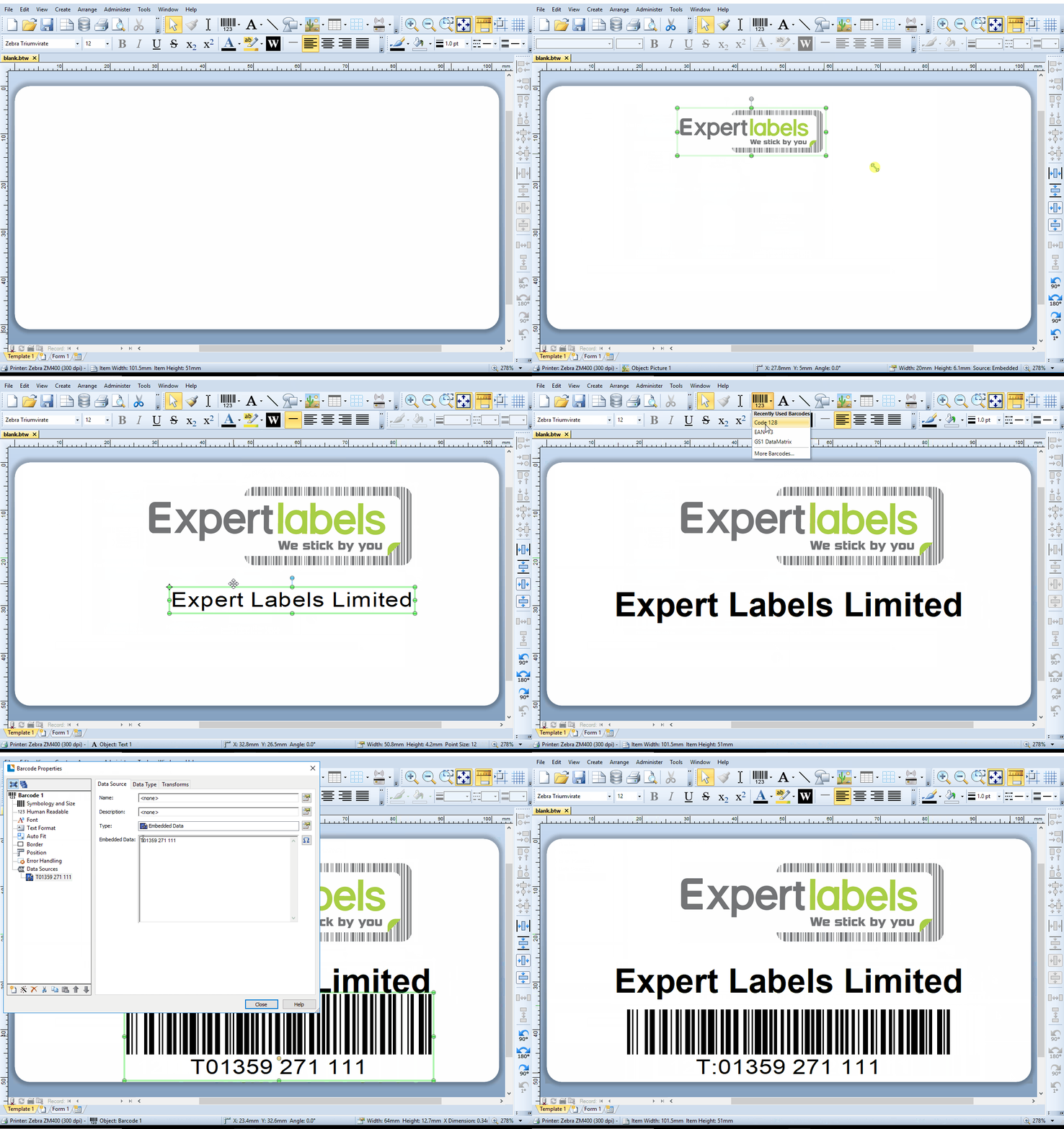
  • Course 2 – How to add text and graphics in less than five minutes – Bonus – design your labels in 3 minutes
  • Course 3 – Adding barcodes to your labels
  • Course 4 – Connecting and using data with your label templates
  • Course 5 – Using forms to enter label data
  • Course 6 – Added extras – adding security to your templates, label design template guide and highlighting allergens automatically.


Prices:

£25 per course.  This includes video, workbook, online assessment and expert help and advice.

Food Labelling Regulations

As a food manufacturer or processor you have an obligation to ensure your labels meet labelling regulations.  In 2016 the European Food Information Regulation was fully introduced and sets out in law what needs to appear on your food labels.  Here’s an explanation of what needs to appear on your labels.
Updates to UK Food Regulations

A lot has happened in UK food labelling regulations since we originally posted this article up in 2019.  All these regulations still apply, but you’ll find the new rules at the bottom of the page.

Name of Food or Drink

The name of your food or drink must be clearly stated on the packaging.  If your food name gives no indication about what is in the item or how it is processed, this information is even more crucial to your consumers.

You will need to add how the food has been processed i.e salted, smoked or dried.  Your name should also include a description to describe any differences to similar products for example a ‘fruit ice cream or ‘fruit drink’ should be made using real fruits.  Whereas a fruit flavoured product can be used using artificial flavourings.

List of Ingredients

As it suggests, this list must include all of the ingredients used in the food or drink, even water and any additives.  You will need to list the ingredients by order of weight, starting with the largest used ingredient and ending with the smallest. 

You need to list the ingredient names in the language applicable to where the item is being sold.

Genetically Modified (GM) Ingredients

Any genetically modified organisms (GMOs) or ingredients made from GMOs must be listed or indicated on the food label. 

Labels costing pennies can increase the perceived value of your food product so you can charge more.

Click here so we can help you make your product labels look beautiful.

Foods made with GM technology (e.g. cheese produced with GM enzymes) or any products such as meat, milk and eggs from animals fed on GM animal feed do not have to be labelled.

Drinks Containing Alcohol or Caffeine

Drinks or beverages that contain more than 1.2% by volume of alcohol must be labelled with the actual strength of the volume of alcohol. Beverages with high caffeine content, i.e. more than 150mg/l,  have to be labelled with the amount of caffeine that they contain, unless they are based on coffee or tea. This is because drinks containing high amounts of caffeine are not recommended for children or pregnant or breastfeeding women.

Weight or Volume

The weight or volume of a food or drink must be shown on the label if it is more than 5g or 5ml. The weight or volume does not have to be exact but must be at least within a few grams or millilitres. Many food types are packages in liquid, e.g. sweetcorn, the drained weight of the food should be clearly displayed. Some foods, such as loose tea and butter, are sold only in standard amounts.

The symbol ‘e’ is used to show that the weight complies with the EU requirement for weight under the average system, i.e. the average pack is at least the weight declared.

Comparing the weight and the price of different brands allows your consumers to make choices on value for money between brands.

Date Marks and Storage Conditions

Nearly all foods must be marked with either a ‘best before’ or ‘use by’ date mark so that it is clear how long a product is likely to last once it has been bought and/or opened by your consumers.

The ‘use by’ date is used for foods that have short lives, e.g. milk, meat, fish and are therefore not safe to eat after this date.

Other foods have a best before date, which means that this date the foods may not be at their best but most likely still safe to eat, subject to being stored appropriately.  Storage instructions must be included to ensure freshness. Following storage and preparation instructions should prevent food from spoiling too quickly, lower the risk of food poisoning and ensure the food looks and tastes its best when eaten.

Other guidance on the mode of storage has become universal. For example, a simple star system is used to indicate what temperature the food should be held at and for how long:

* -6°C for 1 week (pre-frozen food only)

** -12°C for 1 month (pre-frozen food only)

*** -18°C for 3 months (pre-frozen food only)

**** -18°C or colder for 6 months (pre-frozen food; can also be used to freeze fresh food from room temperature)

Preparation and Storage Instructions

Instructions on how to prepare and cook the food must be given on the label if necessary. If the food has to be heated, instructions must be given for the temperature of the oven and cooking time or for how to heat in a microwave (if applicable).  These instructions should ensure the food tastes its best and that it will be thoroughly heated to a core temperature of 75°C, which minimises the risk of food poisoning.

Name and Address of Manufacturer

Contact details for you, the food manufacturer, who is responsible for the information on the label must be stated clearly. This gives your consumers the opportunity to contact you if they have a complaint about the product or if they need to know more about it.

Country of Origin

Your label must display clearly where the food has come from.  You must detail this on the label, otherwise it would be misleading not to show it, e.g. a tub of Greek yogurt which was made in the UK. This includes fresh and frozen meat. The origin of the main ingredients has to be given also if this is different from where the final product is made.

Lot or Batch Number

This is required under UK law but is not part of the labelling regulations. The lot or batch number is a code that can identify batches of food in the event that they have to be recalled by you, the manufacturer, packer or producer. A date mark is sometimes used as a lot mark, or a lot mark may be indicated by the letter ‘L’.

Other Information

Several other details may be included on the label but isn’t mandatory includes:-  recipes and cooking instructions on labels for use of the product. You may wish to include a picture of the product used as a side dish for example, however you must note that the picture is a serving suggestion only, not to show how the food product will look once removed from the packaging.

Allergen Information

There are 14 food ingredients –

  • Milk,
  • Eggs,
  • Peanuts,
  • Nuts from trees (such as Brazil nuts, hazelnuts, almonds and walnuts),
  • Fish,
  • Molluscs (such as mussels and oysters),
  • Crustaceans (including crab and shrimps),
  • Soy beans,
  • Cereals containing gluten (wheat, barley, rye and oats),
  • Lupin,
  • Celery,
  • Mustard,
  • Sesame seeds,
  • Sulphur dioxide and sulphites

– that must always be clearly labelled as they are known to cause allergies and intolerances in some individuals.

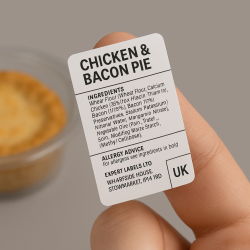
According to the European regulation (which started to come into force from 2014) these ingredients or foods must be declared in the ingredients list and be highlighted in a way that makes it stand out e.g. in a different font or in bold. For example, ‘single cream (milk)’ or ‘salmon (fish)’.

If there is no ingredients list, for example on a bottle of wine that contains sulphites, the food or ingredient must be highlighted somewhere else on the label.

In the regulations, allergen information is not allowed to be repeated anywhere else on packaging. However, sign posting to the allergen information in the ingredients list is allowed. This means allergy advice boxes or statements to warn customers when a food contains an allergen or has a cross-contamination risk with an allergen are no longer allowed.

However, they can be used to direct your consumers to the allergen information in the ingredients list.

The new regulations also ensure that allergy information is provided on non-pre-packed food in restaurants and cafes, either displayed on menus or available on request.

Seven out of ten severe allergic reactions occur when people eat outside of their home so this should be especially helpful to your consumers with food allergies and intolerances.

Mandatory ‘Back of Pack’ Nutrition Labelling

From 13 December 2016, a nutrition declaration on the back of pack has been mandatory for pre-packed foods and has to be presented per 100g/ml or per portion.

The following needs to be included: energy value (in kJ and kcal), and amount in grams of fat, saturates, carbohydrate, sugars, protein and salt.

More information can be included but is not compulsory for monounsaturates, polyunsaturates, starch, fibre, vitamins or minerals.

If a nutrition or health claim is made on the packaging then the nutrient in question must be declared

Voluntary Front of Pack Labelling

Repetition of certain nutrients from back of pack labelling is allowed on a voluntary basis, so if you feel your consumers will benefit from this then go ahead!

In the UK, following new government guidelines, a consistent front of pack labelling scheme has been implemented combining guideline daily amounts (GDA) traffic light colour coding with high, medium or low text.

 If you have a colour label printer , BarTender (the label design software we tend to recommend) is able to dynamically print the ‘traffic light’ colours when printing from a database.


A note on labels

The food labels we provide you with will be manufactured with a Grade A BRC/IoP (British Retail Consortium and Institute of Packaging) accreditation.  That will give your larger retail customers piece of mind.

Just because you need to meet certain regulations for your self-adhesive food labels doesn’t mean you can’t be imaginative and have an eye-catching label.

We can create labels in pretty much any shape for you, from circular to rectangular or even a custom shape to suit your design.

We offer labels with high definition colour, foils, short and long term life and special freezer adhesives all in accordance with the food safe regulations you need to adhere to.

Remember, your product label is a very important marketing tool so you must set the right tone for your product. This is true of any product but especially food. In a supermarket filled with choice, your product needs to show that it will be delicious and high quality, so the label needs to portray this to your customers.

You need an outstanding label to reflect your high quality food and that gives all of the information the customer requires.

Printing your food labels in-house

If you need to overprint a custom label with any changeable information, BarTender is the label software that we recommend (having worked with it for twenty years).  BarTender can be configured to automatically embolden, italicise or underline any of the ingredients or allergens who you need to highlight to your consumers.  It can also automatically create the food ‘traffic lights’ from data in a database. Click here to find out more about BarTender and it’s wealth of capabilities.

Call us today on 01359 271 111 to discuss your food label requirements or email info@expertlabels.co.uk.

Click on the following link to find out more about what you need to show on your labels: https://www.gov.uk/food-labelling-and-packaging/food-labelling-what-you-must-show

Updated Food Regulations - as of 2025

Mandatory UK Address for Food Business Operators (FBOs)

As of 1 January 2024, all prepacked food sold in Great Britain must display a UK, Channel Islands, or Isle of Man address for the business operator. If the business is not based in these regions, the label must include the address of the UK-based importer.

‘Not for EU’ Labelling Requirements under Northern Ireland Retail Movement Scheme (NIRMS)

Under the Northern Ireland Retail Movement Scheme (NIRMS), certain products moving from Great Britain to Northern Ireland require ‘Not for EU’ labelling:

  • Phase 1 (from 1 October 2023): All prepacked meat and some dairy products.
  • Phase 2 (from 1 October 2024): Additional dairy products.
  • Phase 3 (from 1 July 2025): Some composite products, fruit and vegetables, fish, and other specified items.

Country of Origin Labelling Adjustments

From 1 January 2024, when the full individual country information isn’t available, labels must state ‘non-UK’ or ‘UK and non-UK’ instead of ‘non-EU’ or ‘EU and non-EU’. This change affects products like minced meat and certain fish and seafood.

Food label

Updated Allergen Information Guidance

As of March 2025, the Food Standards Agency (FSA) recommends that food businesses provide written allergen information for non-prepacked foods, in addition to verbal communication. This aims to enhance safety for consumers with food hypersensitivities.

Reforms to Regulated Product Authorisations

As of the 1st April 2025, the need for periodic renewal of authorisations for certain regulated products (for example, feed additives, smoke flavourings, Genetically Modified Organisms) has been removed. Authorisations now come into effect following ministerial decisions and are published in official registers

Label Design Software

Download Your Free Label Design Software

Bartender label software

We Help You Choose the Right Label Design Software.

BarTender Label Design Software

Get BarTender Free Edition

(Clicking this button will take you to Seagull Scientific’s website where you can download a free edition of BarTender)

BarTender by Seagull Scientific

Simple to use label design software with a powerful enterprise engine.

Add text, barcodes and graphics to your label in two or three clicks.

Easily connect databases to your labels and streamline your label printing

Password protect label designs from accidental ‘damage’

Add data entry forms at print time to keep label printing simple

Use BarTender to help you design barcodes – no technical knowledge needed.

Super powerful Automation and Enterprise editions let you create label workflows, share label templates, control user permissions and print automatically based on data entry anywhere in the organisation.

Works with any label printer (unlike some other label designers).

MS Windows only.

Free Edition and then with prices from £445 plus VAT.

Download BarTender

(Clicking this button will take you to Seagull Scientific’s website where you can download a free edition of BarTender)

About

Expert labels are specialists in providing printers, labels, barcode scanners and software.  We:

  • Help you choose the best label design software and
  • Provide support you when you need it
  • Offer set-up training – remotely or on site and can create your label designs for you if needed.
  • Provide an integration service for clients wanting to print directly from ERP and large corporate systems.

Expert Labels

  • Have been supplying labels, tags, tickets, barcode scanners and printers since 1994
  • Use BarTender to design and print labels in house
  • Work closely with Seagull Scientific (BarTender’s developers) to implement label printing integrations
  • Are trusted by many of Europe’s best known companies to delivery on time and to exacting standards of quality
  • Stand by our products with a money back guarantee

We work with organisations who appreciate a supplier who provides end-to-end printing and scanning expertise.

Some of Our Clients…

Some of the hundreds of clients who trust us for their labels, printers and scanners.

Some of our better known clients
Epson Colorworks C3500

Label Printing Services

Label Printing Services

Are you looking for printed labels in small or large quantities, with text or data printed to your specific requirements. Perhaps for mailshot address labels, barcode labels, batch labels, product serial numbers, offer codes, etc. Sometimes having someone else to do your label printing makes good business sense. Save buying printers and software and stocks of labels, and have us print your short run label jobs.

Many sizes of labels are available in various materials to suit all applications. We can provide standard paper labels with permanent or removable adhesive, waterproof and tearproof materials for outdoor use or for more demanding environments and many others.

More than just Barcode Label Printing

We work with our customers to provide a wide range of different printed label requirements such as

  • Barcodes
  • Product names and descriptions
  • Part numbers
  • Lot numbers
  • Batch numbers
  • Serial numbers
  • Mail shot addresses
  • Asset ID descriptions and barcodes
  • Complex sequential numbers
  • Variable information from databases
  • and many others

If you know what you need, get a quote by clicking here.

If you have some questions or would like further information – talk to one of our experts – call 01359 271 111 or email us now at info@expertlabels.co.uk
Alternatively have a look at our our guide on the following pages  http://expertlabels.co.uk/services/barcode-label-printing/